Microsoft 365 and Office | Subscription, account, billing | For education | Other
Microsoft 365 features that help users manage their subscriptions, account settings, and billing information.

This browser is no longer supported.
Upgrade to Microsoft Edge to take advantage of the latest features, security updates, and technical support.
' cx='32' cy='32' r='32' /%3E%3Ctext x='50%25' y='55%25' dominant-baseline='middle' text-anchor='middle' fill='%23FFF' %3EJL%3C/text%3E%3C/svg%3E)
Hello,
previously, like What Microsoft 365 business product or license do I have?, I was able to check the assigned Microsoft 365 license on My account page.
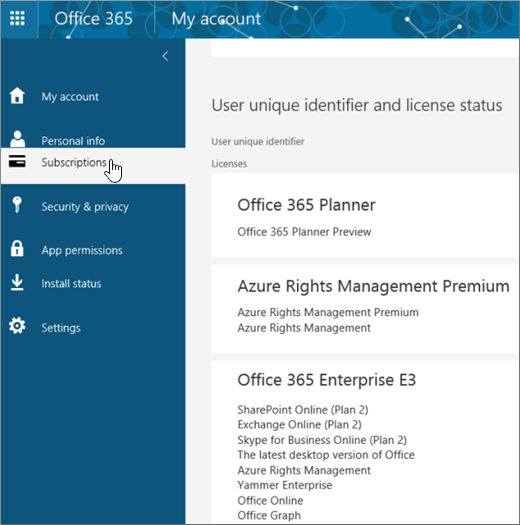
However, recently, after UI renewal, the Subscriptions section seems to have disappeared. How can I check it as before?
Locked Question. This question was migrated from the Microsoft Support Community. You can vote on whether it's helpful, but you can't add comments or replies or follow the question.
' cx='32' cy='32' r='32' /%3E%3Ctext x='50%25' y='55%25' dominant-baseline='middle' text-anchor='middle' fill='%23FFF' %3EA%3C/text%3E%3C/svg%3E)
Hello junsungE,
Many thanks for the response.
It seems currently on that first page of my account there is no subscription, however you can access it by going to Home | Microsoft 365 (office.com) the click on "Install and More".
Then it will open another My account page which is My account (office.com); Hence from this page you can access your Subscriptions as it used to be.
If you don't mind, could you kindly submit your feedback and vote in order to make this thread a top content and help any other community users who might be facing a similar scenario to easily find this thread/post.
Feel free to post back to the forum if any issue comes up and we'll be glad to assist.
Thank you for your time and have a great day.
Hello junsungE,
Many thanks for the response.
It seems currently on that first page of my account there is no subscription, however you can access it by going to Home | Microsoft 365 (office.com) the click on "Install and More".
Then it will open another My account page which is My account (office.com); Hence from this page you can access your Subscriptions as it used to be.
If you don't mind, could you kindly submit your feedback and vote in order to make this thread a top content and help any other community users who might be facing a similar scenario to easily find this thread/post.
Feel free to post back to the forum if any issue comes up and we'll be glad to assist.
Thank you for your time and have a great day.
Hi De Paul,
Thank you very much, this resolved the issue!! Now I can see my Subscriptions.
Have a great weekend!
-junsungE
please send me my Microsoft license no as other people are asking for it and i will not give i to them. they say they will close down my computer completely please supply i want proof as to who I am to listen to.
Hello dear
I am loosing my patience with your product login. I need to know what is the actual cause to this problem
In my case, I am trying to see what Teams license the company I work for has given me. Both the Install and More button and your link to https://portal.office.com/account/?ref=Harmony#subscriptions give me the below error message. Does the Teams desktop application really not have an About Teams section like the Office 365 apps do?
Error Message:
You don't have access to this Your sign-in was successful but you don't have permission to access this resource.