Note
Access to this page requires authorization. You can try signing in or changing directories.
Access to this page requires authorization. You can try changing directories.
This article provides a comprehensive guide on troubleshooting unexpected reboots using system event logs. It helps determine the cause or lead to other troubleshooting steps to find the root cause.
There are generally two types of reboots, normal reboots and unexpected reboots. A normal reboot occurs when a computer is shut down or restarted using the shutdown or restart option in Windows. An unexpected reboot occurs when a computer is running normally but reboots due to power loss, hardware failures, or bug checks.
Review Event IDs 12, 13, 6005, and 6009 for reboot history
You can filter the system event logs to determine the cause of an unexpected reboot. Event IDs 12, 13, 6005, and 6009 can show the reboot history and frequency of a computer.
Note
Event ID numbers might be associated with different sources, so make sure you filter on the relevant ones for reboots.

| Event ID | Source | Description |
|---|---|---|
| 12 | Kernel-General | The operating system started at system time <Date Time>. |
| 13 | Kernel-General | The operating system is shutting down at system time <Date Time>. |
| 6005 | EventLog | The Event log service was started. |
| 6009 | EventLog | Microsoft (R) Windows (R) <OS Version> |
Review Event IDs 13, 41, 1074, 6008, and 6009 to determine reboot types
Event IDs 13, 41, 1074, 6008, and 6009 can help determine if a reboot is normal or unexpected. The typical event IDs that indicate a normal reboot are Event ID 1074 followed by Event ID 13 and Event ID 6009. An unexpected reboot is denoted by Event ID 41 and Event ID 6008.
Note
Event ID numbers might be sssociated with different sources, so make sure you filter on the relevant ones for reboots.

| Event ID | Source | Description |
|---|---|---|
| 13 | Kernel-General | The operating system is shutting down at system time <Date Time>. |
| 41 | Kernel-Power | The system has rebooted without cleanly shutting down first. This error could be caused if the system stopped responding, crashed, or lost power unexpectedly. |
| 1074 | User32 | The process <Process Name> has initiated the restart of computer <Computer Name> on behalf of user <Domain User> for the following reason: <Reason> Reason Code: <Hex Code> Shutdown Type: <Type> Comment: |
| 6008 | EventLog | The previous system shutdown at <Time> on <Date> was unexpected. |
| 6009 | EventLog | Microsoft (R) Windows (R) <OS Version>. |
Review Event IDs 19, 41, 1001, 1074, and 7045 for the causes of reboot
Event IDs 19, 41, 1001, 1074, and 7045 might indicate reboot causes. Some reboots are caused by OS updates, bug checks, and user initiated shutdowns or restarts. Other reboots might be required during software installation or management client processes.
| Event ID | Source | Description |
|---|---|---|
| 19 | WindowsUpdateClient | Installation Successful: Windows successfully installed the following update: Security Update for Windows (<KB Number>) |
| 41 | Kernel-Power | The system has rebooted without cleanly shutting down first. This error could be caused if the system stopped responding, crashed, or lost power unexpectedly. |
| 1001 | WER-SystemErrorReporting | The computer has rebooted from a bugcheck. The bugcheck was: 0xXXXXXXXX (0xX, 0xX, 0xX, 0xX). A dump was saved in: C:\Windows\MEMORY.DMP. Report ID: <GUID>. |
| 1074 | User32 | The process <Process Name> has initiated the restart of computer <Computer Name> on behalf of user <Domain User> for the following reason: <Reason> Reason Code: <Hex Code> Shutdown Type: <Type> Comment: |
| 7045 | Service Control Manager | A service was installed in the system. Service Name: <Name> Service File Name: <Path Location> Service Type: <Type Service> Service Start Type: <Start Type> Service Account: <Account> |
By combining all the event IDs together, you can get a history of reboots, shutdowns, and possible reasons why the computer rebooted.

Starting with the normal reboot scenario, you can try to determine why a reboot was iniatiated. It can be due to a Cumulative Update, driver update, application update, or something like a shutdown. In any case, there should be an Event ID 1074 indicating what requested the reboot and a reason.
Here are some examples of different kinds of requests from Event ID 1074:
-
The process <Process Name> has initiated the power off of computer <Computer Name> on behalf of user <Domain User> for the following reason: No title for this reason could be found Reason Code: 0x500ff Shutdown Type: power off Comment: -
The process <Process Name> has initiated the restart of computer <Computer Name> on behalf of user <Domain User> for the following reason: Other (Unplanned) Reason Code: 0x0 Shutdown Type: restart Comment: -
The process <Process Name> has initiated the restart of computer <Computer Name> on behalf of user <Domain User> for the following reason: Operating System: Service pack (Planned)
Reason Code: 0x80020010
Shutdown Type: restart
Comment:
In the examples, the process that requests the reboot is listed followed by the account that initiated the reboot. A reason code and a shutdown type are also listed in the description. In many cases, the process name helps determine what potentially called for the reboot.
Reason codes can be further decoded. For more information, see:
Unexpected reboot examples
With an unexpected reboot, there usually isn't an Event ID 1074 log entry. Unexpected reboots are denoted by Event IDs 41, 1001, and 6008. Here's an example:

| Event ID | Source | Description |
|---|---|---|
| 1001 | WER-SystemErrorReporting | The computer has rebooted from a bugcheck. The bugcheck was: 0xXXXXXXXX (0xX, 0xX, 0xX, 0xX). A dump was saved in: C:\Windows\MEMORY.DMP. Report ID: <GUID>. |
| 41 | Kernel-Power | The system has rebooted without cleanly shutting down first. This error could be caused if the system stopped responding, crashed, or lost power unexpectedly. |
| 6008 | EventLog | The previous system shutdown at <Time> on <Date> was unexpected. |
In this case, the unexpected reboot is caused by a bug check. The bug check might be caused by a recent development. You can look for any driver installations or updates, application installations, or OS updates.
You can check the system reboots history by filtering Event IDs 12, 13, 19, 41, 1001, 1074, 6008, 6009, and 7045. You can use the filtered history to see when the first unexpected reboot or bug check happens and if any new drivers or updates are applied shortly before the issue occurs.
The following history shows there's a driver update, highlighted in red, and the bug check starts shortly after.
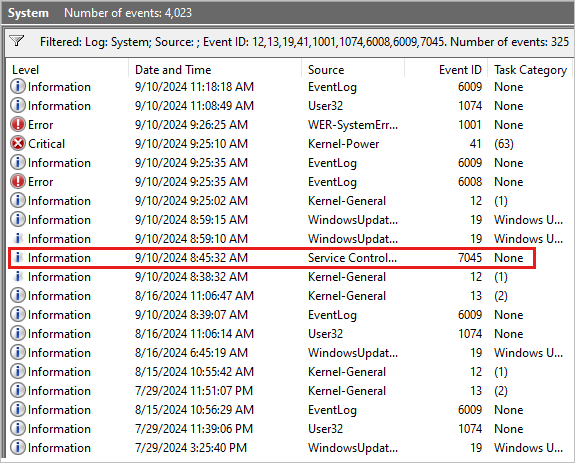
See the following Event ID 7045 for an example:
A service was installed in the system.

Service Name:  Intel(R) Dynamic Application Loader Host Interface Service
Service File Name:  %SystemRoot%\System32\DriverStore\FileRepository\dal.inf_amd64_af50fdb80983f7bc\jhi_service.exe
Service Type:  user mode service
Service Start Type:  auto start
Service Account:  LocalSystem
The example might indicate the bug check is due to a recent driver update. You can remove or roll back the driver update to see whether the bug check stops or not. If not, you can collect a memory dump for analysis.