What is Microsoft Surface Pro 12-inch?
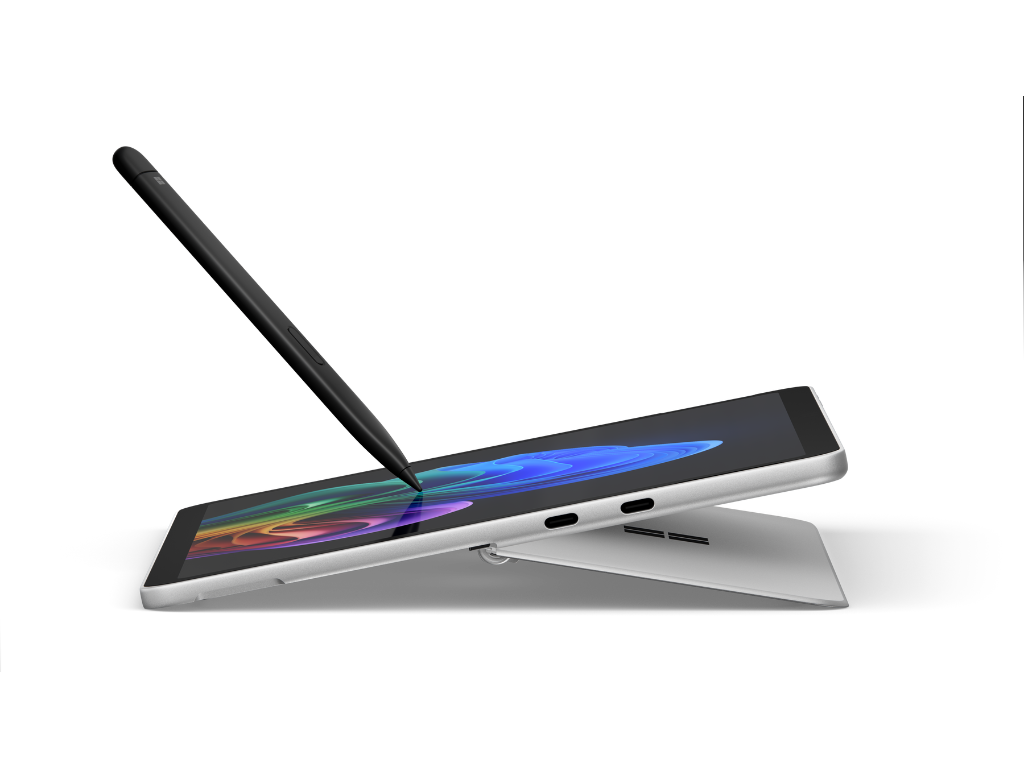
Microsoft Surface Pro 12-inch is a Copilot+ PC built by Microsoft. As a laptop-to-tablet hybrid device, it offers portability to get work done from virtually any location. Combining software, hardware, and AI features, Surface Pro 12-inch allows you to complete your daily tasks through various interaction methods. Surface Pro 12-inch enables business users to execute their goals with the latest generation of hardware and software advancements through various inputs.
Hardware

Imagine your IT team needs to equip a field team with a device that balances performance, portability, and flexibility. Surface Pro 12-inch offers hardware that meets those needs. Let's look at some of the device specifications that solve this need without adding complexity.
- Qualcomm Snapdragon X Plus (8-core) X1P-42-100 processor: The CPU (Central Processing Unit) of Surface Pro 12-inch offers eight cores running at 3.4 GHz, paired with an NPU (Neural Processing Unit) capable of 45 TOPS (trillions of operations per second)—enabling more than 40 local AI models to run directly on the device. This hardware combination enables various on-device AI experiences, including document summarization, multilingual translation, and support for multimonitor setups to complete work.
- 12" PixelSense Display: Surface Pro 12-inch features a 12" anti-reflective display with PixelSense technology, offering touch input in addition to using peripherals and attachable accessories—like the Surface Pro 12-inch Keyboard and Surface Slim Pen (2nd Edition). It also features a 3:2 aspect ratio, ideal for viewing and interacting with vertical content—displaying more data in apps like Microsoft Excel and OneNote. The screen features a 90 Hz dynamic refresh rate and reaches 400 nits of maximum brightness, allowing for a smoother scrolling experience and usability in multiple lighting conditions.
- Ports and charging: Surface Pro 12-inch features two USB-C ports that support charging, data transfer, DisplayPort 1.4a (supporting up to two 4-K monitors at 60 Hz), and Surface Thunderbolt 4 dock and other accessories. Charging is done via one of the USB-C ports—supporting fast charging at 45 W.
- Kickstand and storage: On the rear of the device, Surface Pro 12-inch features a designated magnetic charging and storage slot for Surface Slim Pen (sold separately). This slot allows you to have access to your pen easily whenever you need it, even without an optional keyboard attached. , there's a built-in kickstand that allows you to adjust the angle of the device up to 165 degrees—assuring that the best viewing angle is achieved regardless of where it's being used.
- Typing experience: With the optional Surface Pro 12-inch Keyboard, you can turn your Surface Pro 12-inch into a full Windows laptop experience. The keyboard snaps magnetically to the bottom of the device and features a dynamic hinge that doesn't obstruct the screen bezels—ensuring easy access to the taskbar. It also features the Copilot key, allowing you to open the Copilot app and utilize AI features easily and quickly.
Software
In our scenario, your IT team is looking for a solution that places a focus on performance. On-device Copilot+ PC AI features on Surface Pro 12-inch help to accomplish tasks more efficiently.
- Click to Do: This feature identifies text and images on your screen, analyzes them, and provides actionable options that you can select based on the content. Click to Do identifies only the presence of text and images—not their actual content—and performs all processing locally on the device.
- Improved Windows Search: On Surface Pro 12-inch, searching for essential files is now simplified with improved Windows search. Built into File Explorer, the Windows Search box on the taskbar, and in Settings, Windows Search helps you to find what you are looking for by utilizing natural language terms instead of having to remember the full file name and location. This feature also works for system settings–including adding new devices using everyday language such as "add headphones."
- Cocreator in Paint: Surface Pro 12-inch features support for pen input, which is perfect for creating artwork. Cocreator in Paint utilizes on-device AI to extend this capability to create artwork in Microsoft Paint. By entering a simple text prompt and drawing on the canvas, AI creates an image in the side pane with full control of how much AI input to add into your creation.
Security
IT teams value security above many features. Surface Pro 12-inch delivers chip-to-cloud security. Surface Pro 12-inch offers multiple layers of security.
- Secured-core PC: Windows integrates closely with Surface hardware to deliver protections that take advantage of hardware capabilities. As a Secured-core PC, Surface Pro 12-inch uses TPM 2.0 for a hardware root of trust, secure boot, and BitLocker drive encryption. This hardware provides protections that are useful against sophisticated attacks and can provide increased assurance when handling mission-critical data in data-sensitive industries.
- Microsoft Pluton: Surface Pro 12-inch features the Microsoft Pluton security processor—a hardware-based security chip that's integrated directly into the CPU (Central Processing Unit). Microsoft Pluton provides hardware-based root of trust, secure identity, secure attestation, and cryptographic services. Pluton technology is a combination of a secure subsystem, which is part of the System on Chip (SoC), and Microsoft authored software that runs on this integrated secure subsystem.
- Device Firmware Configuration Interface (DFCI): Designed to be used with software-level mobile device management (MDM), DFCI enables IT admins to remotely disable specific hardware components and prevent end users from accessing them. For example, if you need to protect sensitive information in highly secure areas, you can disable the camera, and if you don't want users booting from USB drives, you can disable that as well.
- Windows Autopilot: Deploying Surface Pro 12-inch is simplified for IT teams with Windows Autopilot. This feature simplifies the Windows device lifecycle, for both IT and end users, from initial development to end of life. Autopilot streamlines IT deployment processes, minimizes infrastructure maintenance requirements, and enhances usability for end users.