Note
Access to this page requires authorization. You can try signing in or changing directories.
Access to this page requires authorization. You can try changing directories.
Applies to:  SQL Server on Linux
This article provides an overview of business continuity solutions for high availability and disaster recovery in SQL Server, on Windows and Linux.
Everyone who deploys SQL Server needs to make sure that all mission critical SQL Server instances and the databases within them are available when the business and end users need them, whether that availability is during regular business hours or around the clock. The goal is to keep the business up and running with minimal or no interruption. This concept is also known as business continuity.
SQL Server 2017 (14.x) and later versions introduced features and enhancements for availability. The biggest addition is support for SQL Server on Linux distributions. For a full list of the new features in SQL Server, see the following articles:
| Version | Operating system |
|---|---|
| What's new in SQL Server 2025 (17.x) | Windows | Linux |
| What's new in SQL Server 2022 (16.x) | Windows | Linux |
| What's new in SQL Server 2019 (15.x) | Windows | Linux |
| What's new in SQL Server 2017 (14.x) | Windows | Linux |
This article focuses on the availability scenarios in SQL Server 2017 (14.x) and later versions, as well as the new and enhanced availability features. The scenarios include hybrid ones that can span SQL Server deployments on both Windows Server and Linux, and ones that can increase the number of readable copies of a database.
While this article doesn't cover availability options external to SQL Server (such as virtualization), everything discussed here applies to SQL Server installations inside a guest virtual machine whether in the public cloud or hosted by an on-premises hypervisor server.
SQL Server scenarios that use availability features
You can use Always On availability groups, failover cluster instances, and log shipping in different ways, and not just for availability. There are four main ways you can use the availability features:
- High availability
- Disaster recovery
- Migrations and upgrades
- Scaling out readable copies of one or more databases
The following sections describe the relevant features for each scenario. One feature not covered is SQL Server replication. While SQL Server replication isn't officially designated as an availability feature under the Always On umbrella, it's often used for making data redundant in certain scenarios. Merge replication isn't supported for SQL Server on Linux. For more information, see SQL Server replication on Linux.
Important
The SQL Server availability features don't replace the requirement to have a robust, well tested backup and restore strategy. A backup and restore strategy is the most fundamental building block of any availability solution.
High availability
It's important to ensure that SQL Server instances or databases are available if a problem occurs that's local to a data center or single region in the cloud. This section explains how the SQL Server availability features can help. All of the features described are available both on Windows Server and on Linux.
Availability groups
Availability groups (AGs) provide database-level protection by sending each transaction of a database to another instance, or replica, which contains a copy of that database in a special state. You can deploy an AG on Standard or Enterprise editions. The instances participating in an AG can be either standalone or failover cluster instances (FCIs, described in the next section). Since the transactions are sent to a replica as they happen, AGs are recommended where there are requirements for lower recovery point and recovery time objectives. Data movement between replicas can be synchronous or asynchronous, with Enterprise edition allowing up to three replicas (including the primary) as synchronous. An AG has one fully read/write copy of the database that is on the primary replica, while all secondary replicas can't receive transactions directly from end users or applications.
Note
Always On is an umbrella term for the availability features in SQL Server and covers both AGs and FCIs. Always On isn't the name of the AG feature.
Before SQL Server 2022 (16.x), AGs only provide database-level, and not instance-level protection. Anything not captured in the transaction log or configured in the database must be manually synchronized for each secondary replica. Some examples of objects that must be synchronized manually are logins at the instance level, linked servers, and SQL Server Agent jobs.
In SQL Server 2022 (16.x) and later versions, you can manage metadata objects including users, logins, permissions, and SQL Server Agent jobs at the AG level in addition to the instance level. For more information, see What is a contained availability group?
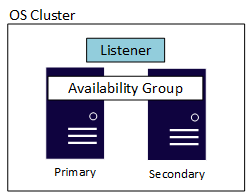
An AG also has another component called the listener, which allows applications and end users to connect without needing to know which SQL Server instance is hosting the primary replica. Each AG has its own listener. While the implementations of the listener are slightly different on Windows Server versus Linux, they both provide the same functionality and usability. The following diagram shows a Windows Server-based AG that's using a Windows Server Failover Cluster (WSFC). An underlying cluster at the OS layer is required for availability whether it's on Linux or Windows Server. The example shows a simple configuration with two servers, or nodes, with a WSFC as the underlying cluster.
Standard and Enterprise edition have different maximums when it comes to replicas. An AG in Standard edition, known as a basic availability group, supports two replicas (one primary and one secondary) with only a single database in the AG. Enterprise edition not only allows multiple databases to be configured in a single AG, but also can have up to nine total replicas (one primary, eight secondary). Enterprise edition also provides other optional benefits such as readable secondary replicas, the ability to make backups off of a secondary replica, and more.
Note
Database mirroring, which was deprecated in SQL Server 2012 (11.x), isn't available on the Linux version of SQL Server, nor is it added. Customers still using database mirroring should plan to migrate to AGs, which is the replacement for database mirroring.
When it comes to availability, AGs can provide either automatic or manual failover. Automatic failover can occur if synchronous data movement is configured and the database on the primary and secondary replica are in a synchronized state. As long as the listener is used and the application uses a supported version of .NET Framework (3.5 with Service Pack 1, or 4.6.2 and later versions), the failover should be handled with minimal to no effect on end users if a listener is utilized. Failing over to a secondary replica to make it the new primary replica can be configured to be automatic or manual, and is generally measured in seconds.
The following list highlights some differences with AGs on Windows Server versus Linux:
Because of the way the underlying cluster works on Linux and Windows Server, all AG failovers (manual or automatic) are done via the cluster on Linux. On Windows Server-based AG deployments, manual failovers must be done via SQL Server. Automatic failovers are handled by the underlying cluster on both Windows Server and Linux.
For SQL Server on Linux, you should configure an AG with a minimum of three replicas, due to the way that the underlying clustering works.
On Linux, the common name used by each listener is defined in DNS and not in the cluster like it's on Windows Server.
SQL Server 2017 (14.x) introduced the following features and enhancements to AGs:
- Cluster types
REQUIRED_SYNCHRONIZED_SECONDARIES_TO_COMMIT- Enhanced Microsoft Distributor Transaction Coordinator (DTC) support for Windows Server-based configurations
- Additional scale out scenarios for read-only databases (described later in this article)
Availability group cluster types
The built-in availability form of clustering in Windows Server is enabled via a feature named Failover Clustering. It allows you to build a WSFC to be used with an AG or FCI. SQL Server ships cluster-aware resource DLLs that provide integration for AGs and FCIs.
SQL Server on Linux supports multiple clustering technologies. Microsoft supports the SQL Server components, while our partners support the relevant clustering technology. For example, along with Pacemaker, SQL Server on Linux supports HPE Serviceguard and DH2i DxEnterprise as a cluster solution.
A Windows-based failover cluster and Linux cluster solution are more similar than different. Both provide a way to take individual servers and combine them in a configuration to provide availability, and have concepts of things like resources, constraints (even if implemented differently), failover, and so on.
For example, to support Pacemaker for both AG and FCI configurations including things like automatic failover, Microsoft provides the mssql-server-ha package, which is similar to, but not exactly the same as the resource DLLs in a WSFC, for Pacemaker. One of the differences between a WSFC and Pacemaker is that there's no network name resource in Pacemaker, which is the component that helps to abstract the name of the listener (or the name of the FCI) on a WSFC. Use DNS for name resolution on Linux.
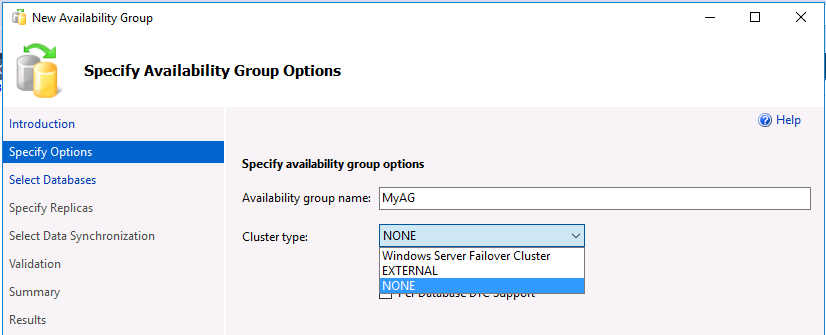
Because of the difference in the cluster stack, AGs in SQL Server 2017 (14.x) and later versions need to handle some of the metadata that is natively handled by a WSFC. For example, there are three cluster types for an availability group, which are stored in sys.availability_groups in the cluster_type and cluster_type_desc columns:
- WSFC
- External
- None
All AGs that require high availability must use an underlying cluster, which in the case of SQL Server 2017 (14.x) and later versions means WSFC or a Linux clustering agent. For Windows Server-based AGs that use an underlying WSFC, the default cluster type is WSFC and you don't need to set it. For Linux-based AGs, you must set the cluster type to External when creating the AG. The integration with an external cluster solution in Linux is configured after the AG is created, whereas on a WSFC, it's done at creation time.
A cluster type of None can be used with both Windows Server and Linux AGs. Setting the cluster type to None means that the AG doesn't require an underlying cluster. This means SQL Server 2017 (14.x) is the first version of SQL Server to support AGs without a cluster, but the tradeoff is that this configuration isn't supported as a high availability solution.
Important
In SQL Server 2017 (14.x) and later versions, you can't change a cluster type for an AG after it's created. This restriction means that an AG can't be switched from None to External or WSFC, and vice versa.
If you only want to add extra read-only copies of a database, or if you want what an AG provides for migration and upgrades but don't want to deal with the complexity of an underlying cluster or even replication, consider setting up an AG with a cluster type of None. For more information, see the sections Migrations and upgrades and read-scale.
The following screenshot shows the support for the different kinds of cluster types in SQL Server Management Studio (SSMS). You must be running version 17.1 or later. The following screenshot is from version 17.2:
REQUIRED_SYNCHRONIZED_SECONDARIES_TO_COMMIT
SQL Server 2016 (13.x) increased support for the number of synchronous replicas from two to three in Enterprise edition. However, if one secondary replica is synchronized but the other replica is having a problem, there's no way to control the behavior to tell the primary to either wait for the misbehaving replica, or to allow it to move on. In this scenario, the primary replica could still receive write traffic even though the secondary replica isn't in a synchronized state, resulting in data loss on the secondary replica.
In SQL Server 2017 (14.x) and later versions, you can control the behavior of what happens when there are synchronous replicas with REQUIRED_SYNCHRONIZED_SECONDARIES_TO_COMMIT. This option works as follows:
- There are three possible values:
0,1, and2. - The value is the number of secondary replicas that must be synchronized, which has implications for data loss, AG availability, and failover.
- For WSFCs and a cluster type of None, the default value is
0, and you can manually set it to1or2. - For a cluster type of External, the cluster mechanism sets this value by default, and you can override it manually. For three synchronous replicas, the default value is
1.
On Linux, you configure the value for REQUIRED_SYNCHRONIZED_SECONDARIES_TO_COMMIT on the AG resource in the cluster. On Windows, you set it via Transact-SQL.
A value that's higher than 0 ensures higher data protection, because if the required number of secondary replicas isn't available, the primary isn't available until that condition resolves. REQUIRED_SYNCHRONIZED_SECONDARIES_TO_COMMIT also affects failover behavior since automatic failover can't occur if the right number of secondary replicas aren't in the proper state. On Linux, a value of 0 doesn't allow automatic failover, so when using synchronous with automatic failover on Linux, you must set the value higher than 0 to achieve automatic failover. 0 on Windows Server is the behavior in SQL Server 2016 (13.x) and earlier versions.
Enhanced Microsoft Distributed Transaction Coordinator support
Before SQL Server 2016 (13.x), the only way to get availability in SQL Server for applications that require distributed transactions, which use DTC underneath the covers, was to deploy FCIs. A distributed transaction can be done in one of two ways:
- A transaction that spans more than one database in the same SQL Server instance.
- A transaction that spans more than one SQL Server instance or possibly involves a non-SQL Server data source.
SQL Server 2016 (13.x) introduced partial support for DTC with AGs that covered the latter scenario. SQL Server 2017 (14.x) completes the story by supporting both scenarios with DTC.
In SQL Server 2017 (14.x) and later versions, you can add DTC support to an AG after it's created. In SQL Server 2016 (13.x), you can only enable DTC support when creating the AG.
Failover cluster instances
Failover cluster instances (FCIs) provide availability for the entire installation of SQL Server, known as an instance. With FCIs, if the underlying server encounters a problem, everything inside the instance is moved to another server, including databases, SQL Server Agent jobs, linked servers, and more. All FCIs require some shared storage, even if it's network defined. One node can run and own the FCI's resources at any given time. In the following diagram, the first node of the cluster owns the FCI. It also owns the shared storage resources associated with it, which the solid line to the storage denotes.

After a failover, ownership changes, as shown in the following diagram:

An FCI has zero data loss, but the underlying shared storage is a single point of failure since there's one copy of the data. To have redundant copies of databases, combine FCIs with another availability method, such as an AG or log shipping. The other method must use physically separate storage from the FCI. When the FCI fails over to another node, it stops on one node and starts on another. This process is similar to powering off a server and turning it on.
An FCI goes through the normal recovery process. It rolls forward any transactions that need to be rolled forward, and rolls back any incomplete transactions. Therefore, the database is consistent from a data point to the time of the failure or manual failover, so there's no data loss. Databases are only available after recovery is complete. Recovery time depends on many factors and is generally longer than failing over an AG. The tradeoff is that when you fail over an AG, there might be extra tasks required to make a database usable, such as enabling a SQL Server Agent job.
Note
Accelerated database recovery (ADR) can mitigate recovery time. For more information, see Accelerated database recovery.
Like an AG, FCIs abstract which node of the underlying cluster is hosting it. An FCI always retains the same name. Applications and end users never connect to the nodes. Instead, they use the unique name assigned to the FCI. An FCI can participate in an AG as one of the instances hosting either a primary or secondary replica.
The following list highlights some differences with FCIs on Windows Server versus Linux:
- On Windows Server, an FCI is part of the installation process. You configure an FCI on Linux after installing SQL Server.
- Linux only supports a single installation of SQL Server per host, so all FCIs are a default instance. Windows Server supports up to 25 FCIs per WSFC.
- The common name used by FCIs in Linux is defined in DNS, and should be the same as the resource created for the FCI.
Log shipping
If recovery point and recovery time objectives are more flexible, or databases aren't highly mission critical, log shipping is another proven availability feature in SQL Server. Based on SQL Server's native backups, the process for log shipping automatically generates transaction log backups, copies them to one or more instances known as a warm standby, and automatically applies the transaction log backups to that standby. Log shipping uses SQL Server Agent jobs to automate the process of backing up, copying, and applying the transaction log backups.

The biggest advantage of using log shipping is that it accounts for human error, because you can delay the application of transaction logs. For example, if someone issues an UPDATE without a WHERE clause, the standby might not have the change, so you can switch to that while you repair the primary system. While log shipping is easy to configure, switching from the primary to a warm standby, known as a role change, is always manual. You initiate a role change via Transact-SQL, and like an AG, you must manually synchronize all objects not captured in the transaction log. You need to configure log shipping per database, whereas a single AG can contain multiple databases.
Unlike an AG or FCI, log shipping has no abstraction for a role change, which applications must be able to handle. Techniques such as a DNS alias (CNAME) could be employed, but there are pros and cons, such as the time it takes for DNS to refresh after the switch.
Disaster recovery
When your primary availability location experiences a catastrophic event like an earthquake or flood, the business must be prepared to have its systems come online elsewhere. This section covers how the SQL Server availability features can assist with business continuity.
Availability groups
One of the benefits of AGs is that you configure both high availability and disaster recovery using a single feature. Without the requirement for ensuring that shared storage is also highly available, it's much easier to have replicas that are local in one data center for high availability, and remote ones in other data centers for disaster recovery each with separate storage. Having extra copies of the database is the tradeoff for ensuring redundancy. An example of an AG that spans multiple data centers is shown in the following diagram. One primary replica is responsible for keeping all secondary replicas synchronized.
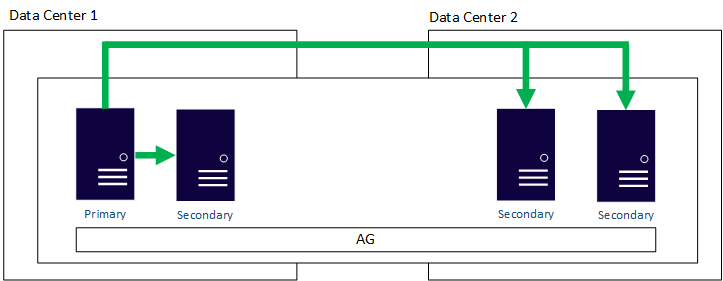
Outside of an AG with a cluster type of None, an AG requires that all replicas are part of the same underlying cluster whether it's a WSFC or an external cluster solution. In the previous diagram, the WSFC is stretched to work in two different data centers, which adds complexity regardless of the platform (Windows Server or Linux). Stretching clusters across distance adds complexity.
Introduced in SQL Server 2016 (13.x), a distributed availability group allows an AG to span AGs configured on different clusters. Distributed AGs decouple the requirement to have the nodes all participate in the same cluster, which makes configuring disaster recovery much easier. For more information on distributed AGs, see Distributed availability groups.

Failover cluster instances
You can use FCIs for disaster recovery. As with a normal AG, you must extend the underlying cluster mechanism to all locations, which adds complexity. For FCIs, you also need to consider the shared storage. The primary and secondary sites need access to the same disks. To ensure that the storage used by the FCI exists in both sites, use an external method such as functionality provided by the storage vendor at the hardware layer. Alternatively, use Storage Replica in Windows Server.

Log shipping
Log shipping is one of the oldest methods for providing disaster recovery for SQL Server databases. Log shipping is often used with AGs and FCIs to provide cost-effective and simpler disaster recovery where other options might be challenging due to environment, administrative skills, or budget. Similar to the high availability story for log shipping, many environments delay the loading of a transaction log to account for human error.
Migrations and upgrades
When an organization deploys new instances or upgrades old ones, it can't tolerate long outages. This section discusses how the availability features of SQL Server can be used to minimize the downtime in a planned architecture change, server switch, platform change (such as Windows Server to Linux or vice versa), or during patching.
Note
You can also use other methods, such as backups and restores, for migrations and upgrades. This article doesn't discuss those methods.
Availability groups
You can upgrade an existing instance that contains one or more availability groups (AGs) in place, to later versions of SQL Server. While this upgrade requires some amount of downtime, it can be minimized with the right amount of planning.
If you want to migrate to new servers without changing the configuration (including the operating system or SQL Server version), add those servers as nodes to the existing underlying cluster, then add them to the AG. Once the replica or replicas are in the right state, manually fail over to a new server. Then, remove the old servers from the AG and decommission them.
Distributed AGs are also another method to migrate to a new configuration or upgrade SQL Server. Because a distributed AG supports different underlying AGs on different architectures, you can change from SQL Server 2019 (15.x) running on Windows Server 2019 to SQL Server 2025 (17.x) running on Windows Server 2025.
Finally, AGs with a cluster type of None are useful for migration or upgrading. You can't mix and match cluster types in a typical AG configuration, so all replicas need to be a type of None. A distributed AG can be used to span AGs configured with different cluster types. This method is also supported across the different OS platforms.
All variants of AGs for migrations and upgrades allow data synchronization, the most time-consuming portion of work, to be spread out over time. When it comes time to initiate the switch to the new configuration, the cutover is a brief outage, versus one long period of downtime where all work, including data synchronization, needs to be completed.
AGs can provide minimal downtime during patching of the underlying OS by manually failing over the primary to a secondary replica while the patching is in progress. From an operating system perspective, doing this is more common on Windows Server, because servicing the underlying OS can require a restart. Patching Linux sometimes needs a restart, but it's less common.
Another way to minimize downtime is to patch SQL Server instances participating in an availability group, depending on how complex the AG architecture is. You patch a secondary replica first. Once the right number of replicas are patched, manually fail over the primary replica to another node to do the upgrade. Upgrade any remaining secondary replicas at that point.
Failover cluster instances
FCIs on their own can't assist with a traditional migration or upgrade. You have to configure an AG or log shipping for the databases in the FCI and account for all other objects. However, FCIs under Windows Server are still a popular option for when you need to patch the underlying Windows Servers. When you initiate a manual failover, the brief outage replaces having the instance unavailable for the entire time that Windows Server is being patched.
You can upgrade an FCI in place to later versions of SQL Server. For more information, see Upgrade a failover cluster instance.
Log shipping
Log shipping is still a popular option to both migrate and upgrade databases. Similar to AGs, but this time using the transaction log as the synchronization method, the data propagation can be started well in advance of the server switch. At the time of the switch, once all traffic is stopped at the source, a final transaction log would need to be taken, copied, and applied to the new configuration. At that point, the database can be brought online.
Log shipping is often more tolerant of slower networks, and while the switch might be slightly longer than one done using an AG or a distributed AG, it's usually measured in minutes, not hours, days, or weeks.
Similar to AGs, log shipping can provide a way to switch to another server during a maintenance window.
Other SQL Server deployment methods and availability
There are two other deployment methods for SQL Server on Linux: containers and using Azure (or another public cloud provider). The general need for availability exists regardless of how SQL Server is deployed. These two methods have some special considerations when making SQL Server highly available.
SQL Server containers and HA/DR options
SQL Server container deployment is a way to simplify SQL Server provisioning, scaling, and lifecycle management across environments. A container is a complete ready-to-run image of SQL Server.
Depending on your container platform, for example when using a container orchestrator like Kubernetes, if the container is lost, it can be deployed again and attached to the shared storage that was used. While this does provide some resiliency, there's some downtime associated with database recovery, and isn't truly highly available as it would be if using an availability group or FCI.
If you're looking to configure high availability for SQL Server containers deployed on Kubernetes or non-Kubernetes platforms, you can use DH2i DxEnterprise as one of the clustering solutions, on top of which you can configure an AG in high availability mode. This option provides you with the recovery point objective (RPO) and recovery time objective (RTO) expected from a high availability solution.
Linux-based VM deployment
Linux can be deployed with SQL Server on Linux Azure Virtual Machines. As with on premises-based installations, a supported installation requires the use of fencing a failed node that's external to the cluster agent itself. Node fencing is provided via fencing availability agents. Some distributions ship them as part of the platform, while others rely on external hardware and software vendors. Check with your preferred Linux distribution to see what forms of node fencing are provided so that a supported solution can be deployed in the public cloud.
Guides for installing SQL Server on Linux are available for the following distributions:
- Quickstart: Install SQL Server and create a database on Red Hat
- Quickstart: Install SQL Server and create a database on Ubuntu
- Quickstart: Install SQL Server and create a database on SUSE Linux Enterprise Server
Read-scale
Secondary replicas have the ability to be used for read-only queries. There are two ways that can be achieved with an AG:
- Allow direct access to the secondary
- Configuring read only routing, which requires the use of the listener. SQL Server 2016 (13.x) introduced the ability to load balance read-only connections via the listener using a round robin algorithm, allowing read-only requests to be spread across all readable replicas.
Note
Readable secondary replicas are only available in Enterprise edition. Each instance that hosts a readable replica needs a SQL Server license.
Scaling readable copies of a database through AGs was first introduced with distributed AGs in SQL Server 2016 (13.x). This feature offers read-only copies of the database not only locally, but also regionally and globally, with minimal configuration. This setup reduces network traffic and latency by having queries execute locally. Each primary replica of an AG can seed two other AGs, even if it isn't the fully read/write copy, and each distributed AG can support up to 27 readable copies of the data.

In SQL Server 2017 (14.x) and later versions, you can create a near-real time, read-only solution with AGs configured with a cluster type of None. If your goal is to use AGs for readable secondary replicas and not availability, this approach removes the complexity of using a WSFC or an external cluster solution on Linux. It provides the readable benefits of an AG in a simpler deployment method.
The only major caveat is that, due to no underlying cluster with a cluster type of None, configuring read-only routing is a little different. From a SQL Server perspective, a listener is still required to route the requests even though there's no cluster. Instead of configuring a traditional listener, use the IP address or name of the primary replica. The primary replica then routes the read-only requests.
A log shipping warm standby can technically be configured for readable usage by restoring the database WITH STANDBY. However, because the transaction logs require exclusive use of the database for restoration, it means that users can't be accessing the database while that happens. This makes log shipping a less than ideal solution - especially if near real-time data is required.
Unlike with transactional replication where all of the data is live, each secondary replica in a read-scale scenario is an exact copy of the primary. The replica isn't in a state where unique indexes can be applied. If any indexes are required for reporting or if data needs to be manipulated, you must create those indexes on the databases on the primary replica. If you need that flexibility, replication is a better solution for readable data.
Cross-platform and Linux distribution interoperability
With SQL Server support on both Windows Server and Linux, this section covers how they can work together for availability in addition to other purposes. It also covers the story for solutions that incorporate more than one Linux distribution.
Note
There are no scenarios where a WSFC-based failover cluster instance (FCI) or availability group (AG) works with a Linux-based FCI or AG directly. A Windows Server Failover Cluster (WSFC) can't be extended by a Pacemaker node and vice versa.
Distributed availability groups
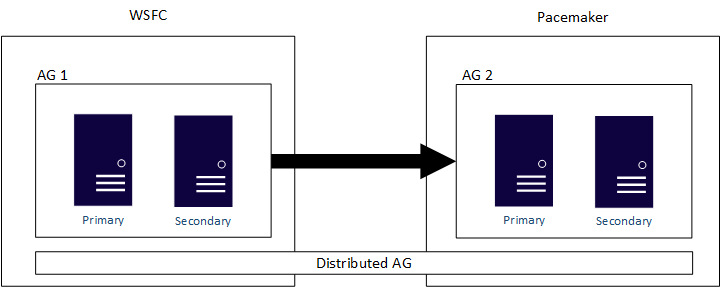
Distributed AGs are designed to span AG configurations, whether those two underlying clusters underneath the AGs are two different WSFCs, Linux distributions, or one on a WSFC and the other on Linux. A distributed AG is the primary method of having a cross platform solution. A distributed AG is also the primary solution for migrations such as converting from a Windows Server-based SQL Server infrastructure to a Linux-based one if that is what your company wants to do. As noted previously, AGs, and especially distributed AGs, would minimize the time that an application would be unavailable for use. An example of a distributed AG that spans a WSFC and Pacemaker is shown in the following diagram:

If you configure an AG with a cluster type of None, it can span Windows Server and Linux, and multiple Linux distributions. Since this configuration isn't true high availability, don't use it for mission critical deployments. Instead, use it for read-scale or migration and upgrade scenarios.
Log shipping
Log shipping is based on backup and restore, so there are no differences in the databases, file structures, and other elements for SQL Server on Windows Server versus SQL Server on Linux. You can configure log shipping between a Windows Server-based SQL Server installation and a Linux one, and between distributions of Linux. Everything else remains the same.
Just like with an AG, log shipping doesn't work when the source server is at a higher SQL Server major version, against a target that is at a lower major version.
Summary
You can make instances and databases of SQL Server 2017 (14.x) and later versions highly available by using the same features on both Windows Server and Linux. Besides standard availability scenarios of local high availability and disaster recovery, you can minimize downtime associated with upgrades and migrations by using the availability features in SQL Server. AGs can also provide extra copies of a database as part of the same architecture to scale out readable copies. Whether you're deploying a new solution or considering an upgrade, SQL Server has the availability and reliability you require.