Note
Access to this page requires authorization. You can try signing in or changing directories.
Access to this page requires authorization. You can try changing directories.
Applies to:  SQL Server
Azure SQL Database
Azure SQL Managed Instance
Azure Synapse Analytics
Analytics Platform System (PDW)
SQL database in Microsoft Fabric
SQL Server
Azure SQL Database
Azure SQL Managed Instance
Azure Synapse Analytics
Analytics Platform System (PDW)
SQL database in Microsoft Fabric

Connection tab
Use the Connection tab to specify how to connect to your data using the Microsoft OLE DB Driver for SQL Server.

The Connection tab is provider-specific and displays only the connection properties that are required by the Microsoft OLE DB Driver for SQL Server.
Select or enter a server name
Select a server name from the dropdown list, or type the location of the server where the database you want to access is located. Selecting the database on the server is a separate action. Update the list by selecting Refresh.
Enter information to sign in to the server
You can select the following authentication options from the dropdown list:
| Value | Description |
|---|---|
| Windows Authentication | Authenticate to SQL Server using the currently logged-in user's Windows account credentials. |
| SQL Server Authentication | Authenticate using SQL username and password. |
| Active Directory - Integrated | Integrated Windows authentication through Microsoft Entra ID. This mode is used for Windows authentication in Active Directory environments federated with Microsoft Entra ID. |
| Active Directory - Password | Username and password authentication with a Microsoft Entra identity. |
| Active Directory - Universal with MFA support | Interactive authentication with a Microsoft Entra identity. This mode supports Microsoft Entra multifactor authentication. |
| Active Directory - Service Principal | Authentication with a Microsoft Entra service principal. Login ID should be set to the application (client) ID. Password should be set to the application (client) secret. |
Server SPN
If you use a trusted connection, you can specify a service principal name (SPN) for the server.
User name
Type the User ID to use for authentication when you sign in to the data source.
Password
Type the password to use for authentication when you sign in to the data source.
Blank password
When checked, enables the specified provider to use a blank password in the connection string.
Allow saving password
When checked, allows the password to be saved with the connection string. Whether the password is included in the connection string depends on the functionality of the calling application.
Note
If saved, the password is returned and saved unmasked and unencrypted.
Use strong encryption for data
When checked, data that is passed through the connection will be encrypted. This option is only available for versions 18.x.x.
Trust server certificate
When unchecked, the server's certificate will be validated. Server's certificate must have the correct hostname of the server and issued by a trusted certificate authority. This option is only available for versions 18.x.x.
Select the database
Select or type the database name that you want to access.
Attach a database file as a database name
Specifies the name of the primary file for an attachable database. This database is attached and used as the default database for the data source. In the first textbox under this section, type the database name to use for the attached database file.
Type the full path to the database file to be attached in text box labeled Using the filename, or select the ... button to browse for the database file.
Change Password
Displays Change SQL Server Password dialog.
Test Connection
Select to attempt a connection to the specified data source. If the connection fails, ensure that the settings are correct. For example, spelling errors and case sensitivity can cause failed connections.
Advanced tab
Use the Advanced tab to view and set additional initialization properties.
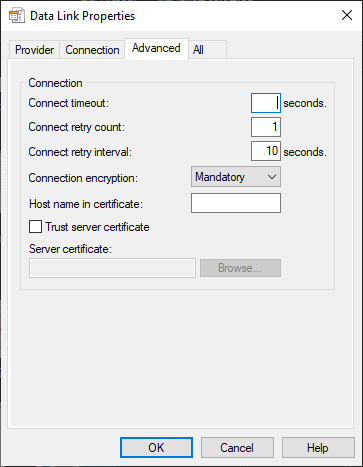
Connect timeout
Specifies the amount of time (in seconds) that the Microsoft OLE DB Driver for SQL Server waits for initialization to complete. If initialization times out, an error is returned and the connection isn't created.
Connect retry count
Specifies the number of times that the Microsoft OLE DB Driver for SQL Server will attempt to reconnect in the case of connection loss.
Connect retry interval
Specifies the amount of time (in seconds) that the Microsoft OLE DB Driver for SQL Server will wait between reconnection attempts.
Connection encryption
When Mandatory or Strict, data that is passed through the connection will be encrypted. The Strict option additionally encrypts the PRELOGIN packets. This option is only available for versions 19.x.x.
Host name in certificate
The host name to be used in validating the SQL Server TLS/SSL certificate. If not set, the driver uses the server name on the connection URL as the host name to validate the SQL Server TLS/SSL certificate. This option is only available for versions 19.x.x.
Trust server certificate
When unchecked, the server's certificate will be validated. Server's certificate must have the correct hostname of the server and issued by a trusted certificate authority. This option is only available for versions 19.x.x.
Server certificate
Specifies the path to a certificate file to match against the SQL Server TLS/SSL certificate. This option can only be used when Strict encryption is enabled.
Type the full path to the certificate file in the text box labeled Server certificate, or select the Browse button to browse for the certificate file. This option is only available in versions 19.2+.
Note
For more general Data Link connection information, see the Data Link API Overview.