Note
Access to this page requires authorization. You can try signing in or changing directories.
Access to this page requires authorization. You can try changing directories.
The City of Montréal is the second-largest city in Canada and the largest city in the province of Québec. With over 1.7 million citizens, Montréal is also the largest French-speaking city in North America. Montréal is distinguished by its cultural vitality and world-renowned creative forces while also being known as an exceptionally inclusive and dynamic city. To better serve its citizens, the City of Montréal is embracing technology to improve access to information and strengthen how the city connects with citizens.
In this case study, you learn:
- How website structure affects agent behavior
- How to optimize web data for agent performance
- How custom entities improve intent recognition
- How to extend analytics beyond Microsoft Copilot Studio
- How Copilot Studio supports connected communities
Challenges
The City of Montréal is committed to providing citizens with fast, efficient access to information and support services. Residents rely on timely, relevant information delivered through multiple channels, including the public website and call center. The website averages over 50,000 visitors a day. With over 40,000 pages of content, finding the right information can be challenging.
To improve accessibility and help the call center manage high volumes and seasonal spikes more effectively, the City of Montréal looked for a solution that would reduce the volume of basic questions call center agents receive, allowing them to prioritize critical inquiries such as emergency calls.
The City of Montréal implemented a Microsoft Copilot Studio conversational agent and integrated it into its website. The initiative involved streamlining over 40,000 pages of content and integrating two internal systems that offered additional resources.
Solution
The Microsoft Copilot Studio conversational agent allows citizens to use natural language to ask questions across a wide range of topics, including public services, administrative procedures, tax payments, municipal regulations, local events, and the maintenance of public spaces.
For example, the agent can answer questions about new regulations for tourist accommodation, required documents for permit applications, and information about upcoming cultural events in the city. The responses are based on content from the City of Montréal’s website and are powered by generative AI. The following image shows how the agent appears online.
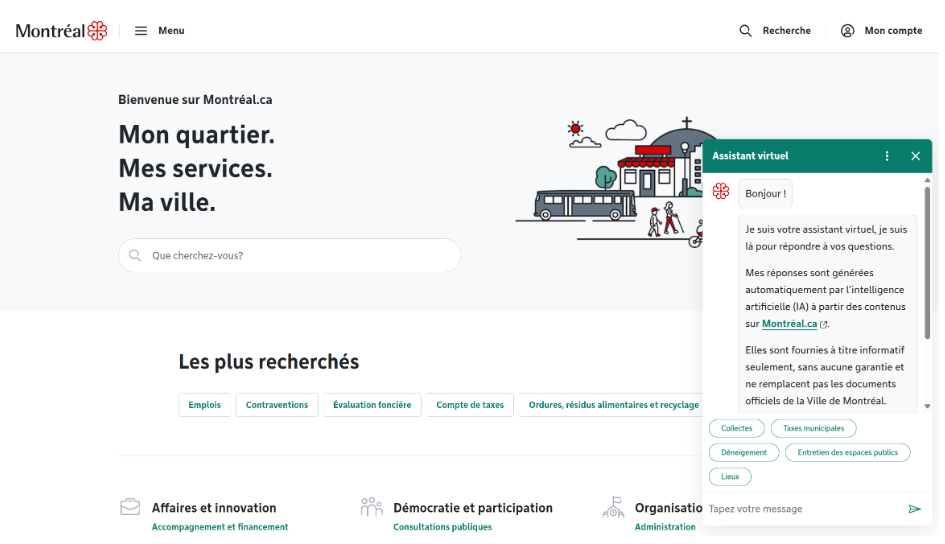
Direct connectivity to back-end systems provides other services. For example, the agent can instantly provide a customized schedule for waste collection or give location-specific information from the relevant city hall.
Over 85 percent of conversations are handled with generative answers connected to the public website. Regular topics and API calls to back-end systems manage the rest. The top questions are about trash collection schedules, tax payments, public space maintenance, and snow removal.
Implementation approach
The City of Montréal set out to develop a virtual assistant to better serve its citizens. The first goal was to connect the assistant to the city’s public website, making information more accessible. The second goal was to surface additional insights by connecting the assistant to two internal systems: waste management and facilities.
After being introduced to Microsoft Copilot Studio, the team began exploring its capabilities. Initially, connecting website pages as knowledge sources failed to deliver the expected results. In response, the City of Montréal focused on:
- Improving Bing indexation to increase page coverage
- Optimizing content structure for better indexing
- Making content not just optimized for search (SEO) but also AI friendly
- Coordinating across web teams for consistent information
- Connecting with backend systems to trigger reindexing for content updates
- Using custom entities to improve intent recognition
- Extending analytics beyond Copilot Studio for deeper insights
To enhance the performance of the agent, the team introduced two custom entities: Postal code and Borough. They used entity synonyms and the business helped update synonyms along with adding trigger phrases. To get the needed analytics, the team explored tools beyond Copilot Studio.
Improve Bing indexation
When you use a public website as a knowledge source in an agent, queries are searched on Bing and return results only from the provided websites. Copilot Studio relies on Bing’s index to generate answers from publicly available content, so better indexation means better agent performance.
The City of Montréal found that while another search engine had indexed hundreds of thousands of their documents, Bing had fewer than 15,000. The team began improving Bing indexation, and within three months, it tripled the number of indexed documents and immediately saw better agent results.
Proper Bing indexation directly affects response accuracy and the robots.txt file plays a key role. It tells search engines which parts of a site they can crawl. If key pages are blocked, Bing doesn't index them, leading to incomplete answers.
The City of Montréal optimized their robots.txt to ensure relevant content was accessible to Bing’s crawlers. This change allowed Copilot Studio to deliver high-quality, context-aware answers based on the latest website information.
Optimize content structure
The City of Montréal continuously refined their website to help Bing index more pages and ensure content is accessible within Copilot Studio. They focused on these areas:
- Initially hidden content on page load such as content inside collapsed sections. Even if Bing indexes this content, it deprioritizes hidden content, assuming it's less important. This means Copilot Studio can't access it.
- Dynamically loaded content such as JavaScript-triggered sections. Bing only indexes what is visible in the initial HTML. A common example is JSON populating entire pages. This issue isn't specific to the City of Montréal but is a general indexing challenge.
- Suboptimal (non-semantic) HTML use in some places such as the use of Cascading Style Sheets (CSS) for text emphasis instead of appropriate heading tags. The team reviewed and standardized the markup, ensuring that semantic elements (for example, H1 for titles, H2 for subtitles) were used correctly. This approach helps the language model understand content hierarchy and improves response quality.
The team invested heavily in content best practices to make everything AI friendly.
Make content AI friendly
Another challenge was that parts of the website weren't SEO friendly. The City of Montréal realized that content should be both SEO and AI friendly, structured so that it can be indexed and queried effectively. For example, this format works well for opening hours:
- Monday: 09:00 AM – 05:00 PM
- Tuesday: 09:00 AM – 05:00 PM
- Wednesday: 09:00 AM – 05:00 PM
- Thursday: 09:00 AM – 05:00 PM
- Friday: 09:00 AM – 03:00 PM
- Saturday: 09:00 AM – 02:00 PM
- Sunday: Closed
By contrast, this version isn't AI friendly: Monday to Friday 8:00 to 6:00 and Saturday to Sunday 9:00 to 5:00. It lacks AM/PM or 24-hour format, groups days together, and isn't structured clearly, making it harder for AI to interpret.
Coordinate web teams
The City of Montréal’s website has around 700 contributors across city services, central departments, and all 19 boroughs. Synchronizing this many people takes effort and requires shared routines and patterns.
A content management system is used, with well-defined fields for data like opening hours and addresses. However, other text fields are often overused. Before Copilot Studio, this wasn't a problem—content rendered properly on the site. When querying with Copilot Studio, the agent couldn't reliably find key details like opening hours, or mixed up data between facilities.
To address this issue, the team began standardizing contributions. Consistency across boroughs became a priority, especially for things like opening hours and addresses. This standardized approach ensured consistent results across all districts. Previously, queries for the same type of facility often returned nothing, or wildly different formats, depending on the borough.
Connect with back-end systems
When website content is updated, there's a delay before it's indexed. For frequently changing information, it's often better to retrieve data through APIs rather than rely solely on website knowledge sources in Copilot Studio. Even if the website shows the correct information, indexing delays prevent Copilot Studio from retrieving the information in real time.
The City of Montréal connects two APIs to their agent and uses the Bing Search API to trigger reindexing whenever new content is published.
- One API provides real-time opening hours for city halls, whose hours change often.
- The second API manages waste collection schedules, including seasonal services like Christmas tree pickup.
Since the waste collection schedule data is unstructured, a generative answers node is used to summarize API responses instead of relying on static content. For waste collection queries, citizens enter their postal code and street number, and the agent retrieves the correct schedule via the API. The language model enriches the response. A planned upgrade includes a location API that auto-fills postal codes to improve the user experience.
Use custom entities
The City of Montréal introduced two custom entities, Postal Code and Borough. There are 19 boroughs, and citizens often spell them incorrectly. The Copilot Studio smart match and synonyms features are used, and there's also a failsafe.
For certain queries, the agent asks for a borough. If the citizen doesn't enter one after two attempts, a selectable list is shown instead. This implementation is a component that can be reused between topics to identify common information.
Collaborative approach for natural language tuning
The City of Montréal learned that creating effective custom topics in Copilot Studio requires more than technical setup. It also needs input from people who understand how citizens actually speak. Business analysts and human agents helped refine the language. The business side added real-world synonyms and phrasing, like recognizing that some citizens say “Saint-Laurent,” while others simply say “Saint Lo.”
Traditionally, the development team worked separately from the business. But with Copilot Studio, business partners can manage entity synonyms and trigger phrases directly. The IT team provided initial training and then handed over ownership, allowing the business side to maintain and evolve the conversational design.
This collaborative model improved both accuracy and maintainability. Business teams could quickly adapt to language changes and analyzed transcripts, while IT focused on website tuning and API integration. Copilot Studio provided a shared workspace where technical structure met everyday language, making the agent smarter, faster, and better aligned with how people actually communicate.
Extend analytics beyond Copilot Studio
The City of Montréal wanted a clearer view of traffic, quality, customer satisfaction, and cost, but the out-of-the-box analytics in Copilot Studio didn't provide the level of detail needed. At the time, consumption data wasn't available.
A custom dashboard was built using an open-source Power BI template connected directly to Dataverse, providing the needed visibility. It tracked topic usage, identified abandoned topics, and analyzed performance and cost.
The following image shows the customized dashboard.

The Copilot Studio Kit is used to analyze transcripts, offering deeper insights into user behavior and helping refine the agent experience.
Technologies used
The City of Montréal used the following technologies:
- Microsoft Copilot Studio
- Power BI
- Power Platform pipelines
Architecture
The conversational agent is embedded on the website https://montreal.ca. The following image shows the overall architecture.

Citizens interact with the website through a chatbot interface that uses custom topics and conversational boosting to guide the experience. When a conversation starts, the system runs intent recognition and entity extraction to understand the user's goal. It retrieves answers from structured website content and from two connected APIs. For insights, the City of Montréal uses a combination of Copilot Studio’s built-in analytics, a Power BI dashboard, and the Copilot Studio Kit.
The following image provides an overview of the technologies used.

The workflow is as follows:
- A citizen visits the City of Montréal’s website and starts a conversation with the embedded virtual assistant.
- Azure middleware removes personal data from messages between clients and back-end services.
- The system recognizes the citizen’s intent. Among the classic orchestration options, it uses natural language understanding (NLU). Custom entities simplify intent recognition and conversation flow.
- The conversation takes different routes depending on the identified intent.
- The conversational boosting topic handles citizen inquiries that aren't covered by custom topics, using generative AI to deliver relevant and helpful responses.
- The agent’s response to a citizen’s inquiry is either grounded in website information or originates from one of two internal systems, the waste management system or the facilities system.
- For deployment, the City of Montréal (after initially relying on manual deployments) uses robust Application Lifecycle Management (ALM) practices with Power Platform pipelines.
- Tracking is done by using a customized Power BI dashboard as a complement to built-in analytics and the Copilot Studio Kit.
- Microsoft Copilot Studio acts as an agent platform, enabling more meaningful interactions with citizens.
One key reason we chose Copilot Studio was the option to easily combine classic, prebuilt responses of a chatbot with the AI-generated responses of an agent. This hybrid option enabled us to achieve a higher level of accuracy than just using generative AI alone.
— Mohamed Arhab, Solution Architect, IT Department of the City of Montréal
Takeaways
The case study of the City of Montréal’s conversational agent built with Microsoft Copilot Studio demonstrates the potential of using Copilot Studio as an agent platform for public-facing agents. Here are some key takeaways for IT professionals who want to implement a similar solution in their own organizations:
- The existing web page's structure might not be optimal for agents.
- Improving Bing indexing leads to more accurate responses.
- Hidden fields aren't accessible to the agent, even if they contain useful data.
- Dynamic content isn't indexed. Anything loaded after Document Object Model (DOM) rendering might be invisible to the agent.
- Sometimes it's better to place content on a long, scrollable page that's fully visible.
- AI-friendly content on a website means writing clear, direct descriptions.
- Custom entities can improve intent recognition, make smoother integrations, and give more control over conversation flow.
- Consider direct API integration for frequently updated or critical content.
Since the conversational agent was launched, the City of Montréal has received the following key benefits:
- Strong citizen engagement with the virtual assistant.
- Most citizen requests are handled efficiently by generative answers, which provide relevant information with an efficiency rate of 90 percent.
- The chatbot earns high marks from users, with satisfaction levels surpassing 4 out of 5.
The team continues to monitor performance and is committed to further enhancing the agent’s efficiency and resolution rate.
Using Microsoft Copilot Studio, the team was able to build the conversational agent entirely on their own, without support from outside developers or consultants. They were also able to use existing APIs to connect to back-end systems.
“With Copilot Studio, we didn’t have to develop any new custom APIs," reports Mohamed Arhab, Solution Architect. "This approach saved significant development time and resources.”
By involving business teams directly in Copilot Studio, IT was able to hand over ownership of language elements like entities and trigger phrases. This approach freed up technical resources and resulted in an agent that better matched how citizens actually communicate.
Collaborating with our business partner directly in Copilot Studio was a major win for us. We empowered them to manage custom entities and trigger phrases, leveraging their frontline experience with citizens. Their deep understanding of language variations used by the public helped shape a more effective virtual assistant, while allowing our team to focus on broader solution architecture and integration.
— Mohamed Arhab, Solution Architect, IT Department of the City of Montréal
Looking ahead
The City of Montréal is expanding its use of conversational agents with two new assistants for internal use:
- Call center agent combines public website search with internal documentation to help staff follow scripts and answer common citizen questions. A private version gives communications teams access to additional internal content.
- IT support agent simplifies access to documentation across hundreds of applications. It helps new staff ramp up faster and replaces static SharePoint libraries with a conversational interface.
In addition, the following initiatives are on the roadmap:
- Location API integration to enhance the waste collection feature.
- Extending the use of the Copilot Studio Kit to set up test automation.
- Exploring Model Context Protocol (MCP) technology for surfacing APIs and back-end systems.
The City of Montréal continuously refines its citizen-facing virtual assistant, aiming to make it even more comprehensive and helpful for citizens.
“Our goal is to offer the virtual assistant as an additional, highly efficient channel that provides a friendly and accessible way for citizens to find information and access services through natural language interaction,” says Arhab.
This vision guides ongoing enhancements, ensuring the agent evolves alongside citizen needs and digital service priorities.
Related information
- Quickstart: Create and deploy an agent
- Microsoft Copilot Studio guidance documentation
- Use entities and slot filling in agents
- Natural language understanding (NLU) overview
- Intent recognition and entity extraction options for your intelligent application workloads
- Managed Environments overview
- Create and manage solutions in Copilot Studio
- Key concepts for analytics in Copilot Studio
- Add a public website as a knowledge source
- Copilot Studio kit overview