Note
Access to this page requires authorization. You can try signing in or changing directories.
Access to this page requires authorization. You can try changing directories.
Based on your analysis, plan the integration and identify the best pattern for your requirements. The following list of integration patterns isn't exhaustive. You might find that a combination of these patterns best fits your scenario.
Each pattern addresses specific business scenarios and technical constraints:
- Instant trigger pattern: This pattern reflects how users interact with systems. A user-driven action triggers a predefined series of actions.
- Event driven pattern: This pattern requires an automatic trigger, such as a response to events happening in a given system.
- Data consolidation pattern: This pattern is essential for organizations with multiple management systems that require a complete picture of their data across their various systems.
- Service oriented architecture pattern: This pattern typically involves multiple flows across systems, enabling modular, scalable integration in complex environments.
- Synchronization pattern: This pattern keeps data in sync across different databases and addresses performance and regulatory requirements.
Instant trigger pattern
The instant trigger pattern is user-driven and intuitive. It initiates an integration flow when a user performs an action, such as pressing a button in a Power App. This pattern is ideal for scenarios where data is needed on demand and not continuously.
Example scenario
A Power App allows product managers to review customer feedback and create action plans. Some technical specifications are stored in Oracle’s Product Lifecycle Management system. Instead of copying the entire dataset to Dataverse, the app includes a button to fetch data when needed.
Reasons to integrate rather than redirect users to Oracle include:
- Poor user experience
- Security concerns
- Licensing costs
Given the cost-effectiveness of Power Platform integrations, any of these reasons might justify implementation.
Flow design
Use an instant cloud flow triggered by a button press in the application.
This diagram illustrates the Instant trigger pattern, where a user‑initiated action retrieves data from an external system and writes it into Dataverse:

The flow includes these steps:
- Request records from Oracle using parameters (like Product ID) provided by the app.
- Return records from Oracle to the app.
- Write records to Dataverse.
This data is then reflected in the Power Apps interface.
Considerations:
- Data models between Oracle and Dataverse might differ, requiring transformation steps.
- Instant triggers aren't truly instant. Execution time depends on system availability and transformation complexity.
- Add visual indicators in the app to show progress and allow cancellation if the operation takes too long.
- In large organizations, simultaneous requests from many users can strain the system.
- Integrations can fail for various reasons. Ensure the app provides feedback to users during execution. Avoid scenarios where users select a button and receive no response, which leads to a poor user experience.
Event driven pattern
Event-driven (also known as automatic trigger) architectures respond to changes in systems without direct user interaction. For example, triggers can be configured to respond to a record created in Dataverse, incoming emails, files added to OneDrive, and any number of other events. This pattern is intuitive and scalable, making it ideal for automating business processes based on system events.
Example scenario
A customer service department uses a Dataverse-connected app to work on cases and provide updates to customers automatically, without writing emails manually. Only specific changes—such as adding a note or changing the status—should trigger notifications.
Use an automatic trigger in Power Automate to respond to these events. The flow listens for changes in Dataverse records and sends notifications when defined conditions are met.
This diagram shows the automatic trigger pattern, where changes in Dataverse automatically initiate downstream actions that update customers with the relevant case information:

Trigger configuration
Configure the flow as follows:
- Indicate the Change Type to monitor.
- Define the columns to respond to using the Select Columns parameter.
- Use the Filter Rows parameter to ensure only customer-facing status changes trigger the flow, plus any other filtration requirements.
Avoid implementing this logic in the flow itself using an If action. Use trigger parameters to reduce unnecessary executions and improve performance.
Avoid logical conflicts
Evaluate the event logic to prevent unintended behavior:
- Avoid loops where an event triggers an action that retriggers the same event.
- Prevent multiple updates from causing rapid, repeated notifications.
- Design flows to handle edge cases and avoid excessive executions.
Volume and frequency considerations
Understand the expected volume of triggered events. Notification services (email, SMS, and others) limit how many messages you can send in a given time frame.
- Estimate the number of events per day or month.
- Implement throttling or rate-limiting mechanisms.
- Prepare a mitigation plan for unexpected spikes in event frequency.
Data consolidation pattern
Data consolidation (also known as scheduled trigger) helps organizations unify information across multiple systems to support reporting and operational processes. While analytics often require full datasets, operational use cases focus on retrieving only the data needed to complete business tasks.
Example scenario
A company uses three legacy systems to manage core business functions: SAP for orders and accounts receivables, Oracle for product inventory, and IBM for customer-related content management. The organization has commissioned a new Power Platform app to use AI to predict the next best action for each customer based on historical data. The app needs to gather relevant information from all three systems and generate a sales action plan for sales managers to guide engagement.
Integration approach
The integration doesn't require real-time updates or event-driven triggers. Instead, use a scheduled process based on how frequently sales staff interact with customers.
In this use case, a scheduled trigger consolidates data as follows:
- Requests only the necessary data from each system
- Returns the data into a format compatible with Dataverse
- Uploads the data into the AI model for analysis
This diagram illustrates the scheduled data‑consolidation pattern, where a recurring process gathers information from multiple systems and uploads the combined dataset into Dataverse:

Scheduled trigger configuration
Scheduled triggers offer flexible recurrence options, from once per second to once per year. They're predictable in timing but can become unpredictable in volume if data scope expands or growth exceeds expectations.
- Monitor flow execution time to avoid overlaps or delays
- Implement safeguards to prevent performance degradation
- Use Application Insights or similar tools to ensure that the flow runs consistently
Risk mitigation
If a scheduled flow takes longer than expected, it might disrupt business processes. For example, a flow designed to run every 10 minutes might fail if it starts taking longer than 10 minutes to complete.
- Monitor runtime and set alerts for anomalies
- Plan for scalability as data volume increases
- Ensure visibility into flow health to prevent unnoticed failures
Service oriented integration pattern
Large organizations often operate multiple systems across departments. These systems evolve to depend on each other for completing business processes. The integration layer bridges these systems, allowing each to perform its core function while enabling cross-system communication.
Example scenario revisited
Let's continue with our example scenario in which the organization uses multiple systems to manage different parts of the business. SAP handles orders and accounts receivables, Oracle manages product inventory, and IBM stores internal financial documentation. Dataverse runs apps for sales, customer service, and product management. SharePoint supports internal collaboration and knowledge base management, while Maersk APIs automate logistics processes.
This diagram illustrates the event‑driven pattern in a multi‑system landscape, where updates across various enterprise systems trigger automated flows that coordinate data and actions between them:
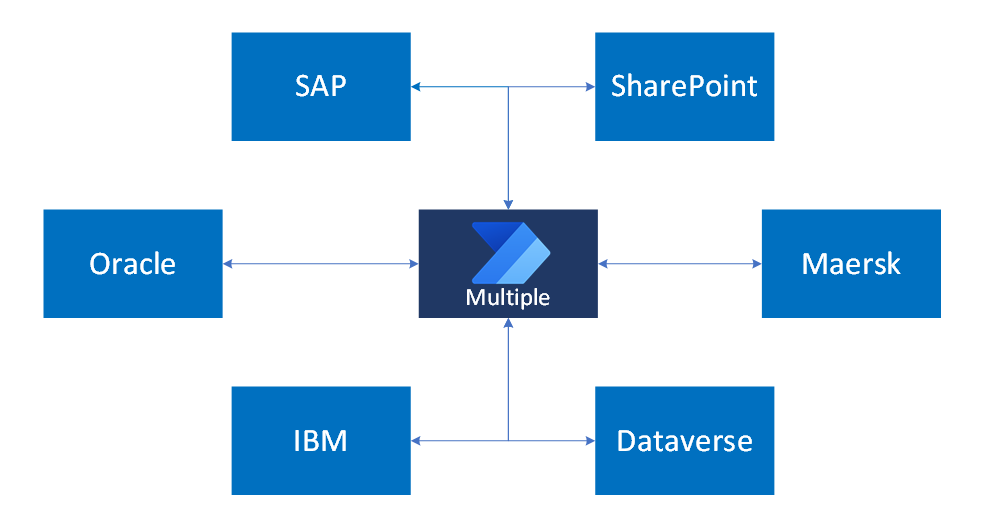
Each system interacts with others through scheduled events or manual user actions. No single flow serves all use cases. Instead, the solution requires multiple flows tailored to specific triggers and business processes.
Avoid monolithic flows
Creating one large flow to handle all integrations isn't practical. It introduces performance, security, and maintenance challenges. Instead:
- Build modular flows for each trigger and process
- Optimize flows for specific use cases
- Scale the integration landscape with manageable components
Optimize cross-system processes
Look for opportunities to consolidate logic where appropriate. For example, if a document in SharePoint must be sent to both SAP and Oracle during the same event, you might be tempted to create one flow that reads the file once and writes it to both systems. First, however, consider whether the logic you're creating is too rigid. In a large landscape, changes to how business processes work across systems happen as often as changes to those systems.
Avoid over-consolidation. Business processes and system configurations change frequently. Rigid, centralized logic reduces flexibility and increases maintenance overhead.
Design flows that are:
- Modular and maintainable
- Scalable across departments and systems
- Resilient to changes in business logic and system behavior
This pattern results in a service-oriented architecture—sometimes humorously called "spaghetti architecture"—where systems are interconnected through well-defined, purpose-built flows.
Data synchronization pattern
Use data synchronization when identical systems store data in separate databases. Although storing the same data twice might seem inefficient, this pattern supports specific business needs, such as performance and regulatory compliance.
- Performance: Local data access improves responsiveness, especially in latency-sensitive industries.
- Compliance: Legal regulations might require data to be stored within national borders. Organizations often deploy local instances with synchronization processes to meet these requirements.
Example scenario
A medical devices company operates across multiple regions in Europe, in cooperation with local medical institutions. The laws of each region are clear about medical data—it must be stored within the borders of that region. Information about orders, products, and shipping can be stored cross-border. To address the regulatory requirements, the company created an instance of their Power Platform customer management app and Dataverse in each region.
To support sales operations, the company wishes to synchronize nonsensitive data, such as contact details, orders, and shipping, across all instances. Medical data is excluded from synchronization.
Integration approach
Use an automatic cloud flow triggered by updates to the Account record. Configure filters to:
- Monitor only allowed fields
- Prevent synchronization of restricted data
This approach results in a targeted, event-driven integration that supports compliance and operational efficiency.
This diagram illustrates the event‑driven synchronization pattern, where updates in one Dataverse environment automatically trigger corresponding updates in another:

Response time expectations
Set realistic expectations for synchronization speed. Power Automate is asynchronous and doesn't guarantee real-time performance. If business users expect immediate data availability, clarify limitations early in the design process.
- Evaluate whether Power Automate meets performance needs
- Avoid over-engineering for real-time access unless justified by business requirements
Many requests for real-time access lack a strong business case. Prioritize clarity, scalability, and maintainability in the integration design.
Beyond cloud flows
When selecting an integration tool, start with Power Automate as the default option. It offers unmatched cost-effectiveness for both development and maintenance.
Power Automate is the preferred integration tool for many scenarios because it:
- Delivers rapid development with low-code connectors
- Minimizes long-term maintenance costs
- Supports a wide range of triggers and systems
- Scales well for most business scenarios
Custom code, Azure Functions, Data Factory, or Service Bus might give you more control or better performance, but they add complexity and cost. Use these options only when Power Automate doesn't meet your business or technical needs.

Example scenario
An online banking service wants to qualify customers for loans more quickly. The qualification process involves complex calculations and data retrieval from multiple systems to arrive at a final risk score. Following an initial evaluation, the banking service considered cloud flow unsuitable given the complexity of the calculations.
However, in this case a hybrid approach is the answer:
- Power Automate to handle data collection with built-in connectors
- Complex calculations encapsulated in custom code running as an Azure Function, which can be independently scaled, or in a custom connector
This hybrid approach balances performance, scalability, and cost.
Integration strategy
Don't choose tools in isolation. Instead, combine their strengths. For example:
- Use Power Automate for orchestration and connectivity
- Use Azure Functions for compute-intensive tasks
- Use custom connectors to extend functionality when needed
Every integration decision must consider the total cost of ownership. Custom solutions might seem powerful but often require a bigger budget for development, licensing, and support. Justify higher costs with clear business value.