Note
Access to this page requires authorization. You can try signing in or changing directories.
Access to this page requires authorization. You can try changing directories.
Many organizations want to use scorecards in processes that help them achieve results more quickly. However, manually monitoring scorecards can be resource intensive and error prone. In this documentation, we go over how you automate business processes when important changes happen within your scorecard. It helps organization quickly respond to changing conditions by keeping everyone up to date, and taking automated actions to improve outcomes. This new capability is easy to use: You launch Power Automate right from your scorecard and immediately construct your automated flow.
Create a flow
On the Scorecards hub page, select the scorecard you want to update.
Select the Create a flow button in the ribbon.

Power Automate opens the Power BI connector page.

Select a trigger to start your flow.
From here, you can create and customize your flows to help automate business processes related to your scorecards. Using Power Automate with your Power BI scorecard helps your teams and organization respond more quickly to changing conditions, and use data to take better actions.
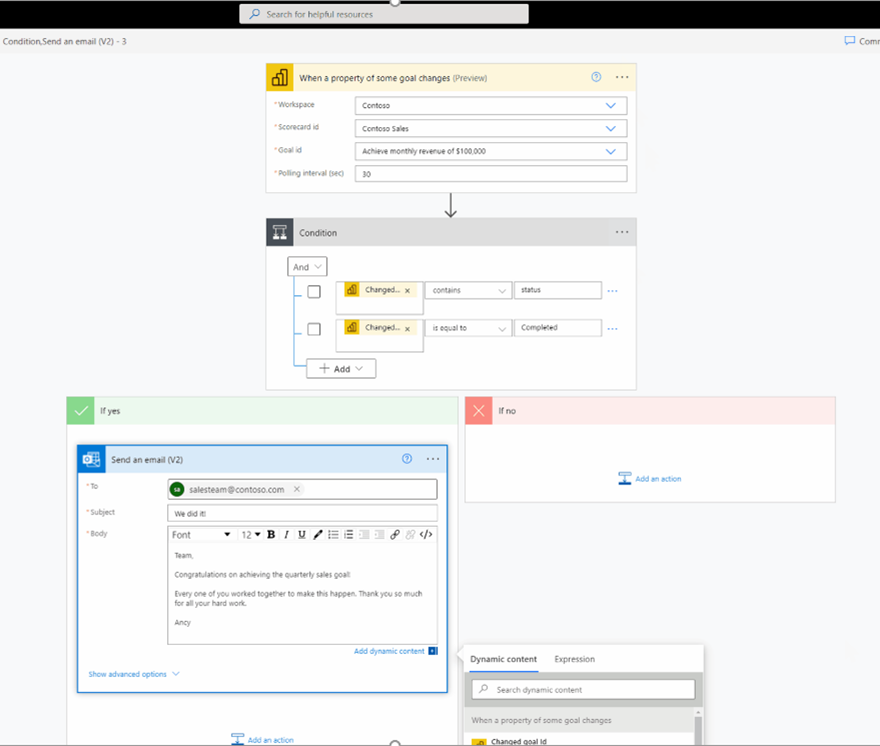
For more information on what each action and trigger does, see the documentation for each one by selecting the information icon to the right of each item, and selecting Learn more.

Actions and triggers
Power Automate offers standalone actions and triggers for your automated flows. For a complete list, see Power BI > Actions and Power BI > Triggers
Related content
- For more information on creating flows, see the Power Automate documentation.
- Get started with goals in Power BI