Note
Access to this page requires authorization. You can try signing in or changing directories.
Access to this page requires authorization. You can try changing directories.
Microsoft 365 Copilot makes it easier for users to work with model-driven apps by offering AI-powered insights through natural language conversations. With this feature, users can quickly find information, navigate apps more easily, and get help to boost their productivity. App makers can enable Microsoft 365 Copilot to give users access to conversational AI that understands app data and provides helpful, contextual answers. Users can ask questions about their Microsoft Dataverse table data in plain language and receive immediate, relevant responses.
This article shows you how to enable and configure Microsoft 365 Copilot for your model-driven apps, both at the environment level and for individual apps.
When enabled, users can open Microsoft 365 Copilot in their model-driven app by selecting Copilot > Chat on the upper-right corner. For more information, see Use Microsoft 365 Copilot in model-driven apps.

Prerequisites
To use Microsoft 365 Copilot in canvas apps, make sure the following prerequisites are met:
- Your tenant must be set to allow Dataverse data available in Microsoft 365 Copilot. For more information, see Enable Microsoft 365 admin center Copilot Dataverse settings.
- Dataverse Search must be set to Default or On for the environment. Fore more information, see Understand what this means for generative AI experiences.
- To use the Microsoft 365 Copilot feature in your app, users must have both a Power Apps premium license and a Microsoft 365 Copilot license.
Note
- Microsoft 365 Copilot for model‑driven apps relies on Dataverse Search indexes. Enabling this feature might increase your environment’s Dataverse capacity consumption. For more information, see What actions can makers or admins take to manage Dataverse Search efficiently.
- Sufficient Dataverse database capacity must be available to support indexing, semantic search, and Copilot operations. For more information, see Capacity page details.
Enable Microsoft 365 Copilot for your environment
To manage Microsoft 365 Copilot for model-driven apps, start by learning how to manage Microsoft 365 Copilot.
Power Platform administrators can set up and configure the Microsoft 365 Copilot feature for users in their environment.
Sign in to the Power Platform admin center.
In the navigation pane, go to Copilot > Settings. Under Power Apps, expand Chat Agent and choose M365 Copilot.

Select an environment group or an environment name, then select Edit Setting.
Select On and then select Save to enable Microsoft 365 Copilot for your canvas apps in the selected environment group or environment.
Enable Microsoft 365 Copilot in a model-driven app
Makers can enable or disable Microsoft 365 Copilot for a specific model-driven app.
Sign in to Power Apps.
Open a model-driven app for editing.
Select Settings in the command bar.
On the left, select Features.
To enable Microsoft 365 Copilot, set M365 Copilot in model-driven apps to On. To disable it, set the option to Off.
Note
This feature is being gradually rolled out across regions and might not be available yet under Features in your region. If you do not see M365 Copilot in model-driven apps under Features, check under Upcoming.
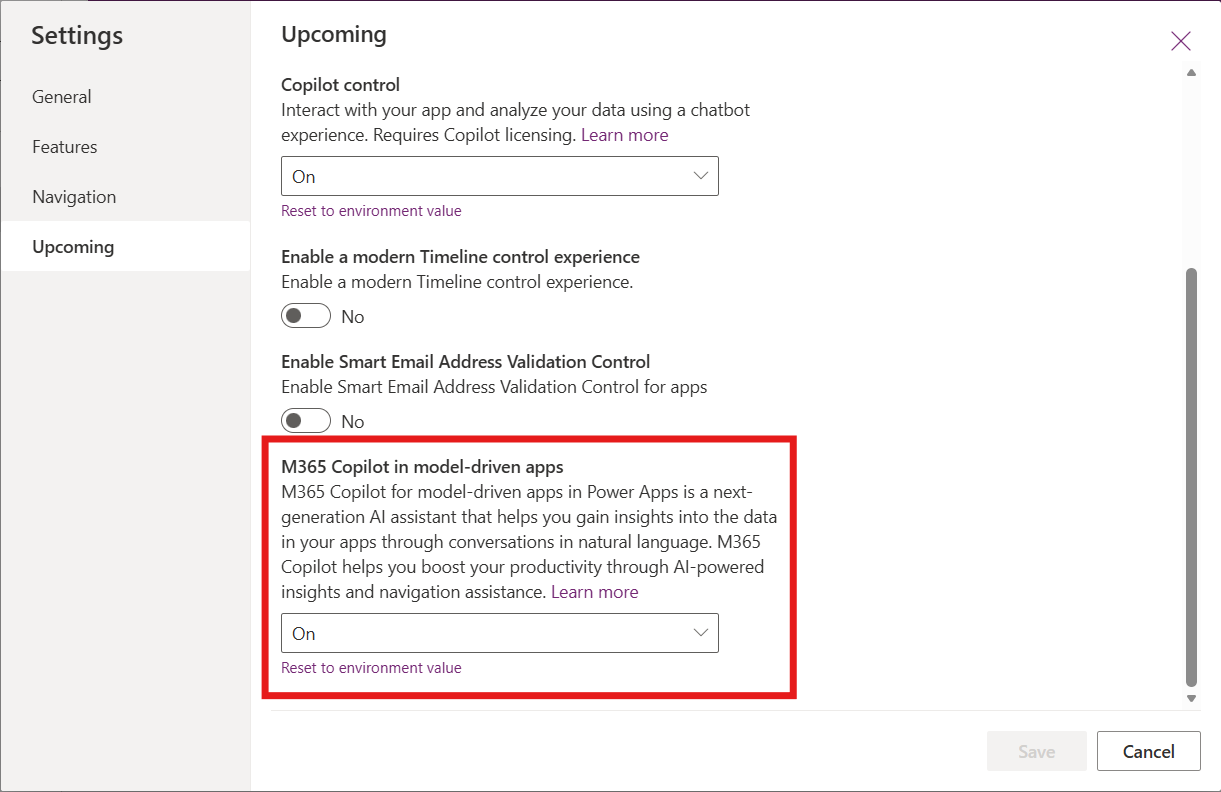
Select Save and then publish the app for the changes to take effect.
Microsoft 365 Copilot vs. Copilot chat
Microsoft 365 Copilot is gradually replacing Copilot chat in model-driven apps.
During the transition period, makers can enable either one or both chat experiences. When both options are available, the Copilot dropdown menu shows the following options:
Chat button opens Microsoft 365 Copilot
App Skills button opens Copilot chat in model-driven apps.

Known limitations
- Microsoft 365 Copilot for model-driven apps allows users to view data by using read-only operations. This capability means that users can only view data that matches their queries and can't make any changes. To make changes, customization with an agent is required.
- Microsoft 365 Copilot for model-driven apps isn't available in the Power Apps mobile app.
- As this feature is being gradually deployed, certain settings in the Power Platform Admin Center might not be accessible yet, depending on the geographic location of your tenant.