Note
Access to this page requires authorization. You can try signing in or changing directories.
Access to this page requires authorization. You can try changing directories.
This article describes how to use the Purge Commerce sales transactions capability to delete old transactional data that is no longer needed in Microsoft Dynamics 365 Commerce.
Because the retention of large amounts of data in Commerce backend systems can increase data costs and affect system performance, organizations often want to remove outdated data. The Commerce version 10.0.42 release gives organizations the capability to delete old transactional data themselves. The Purge commerce sales transactions dialog is available in Commerce headquarters at Retail and Commerce IT > Clean up > Purge commerce sales transactions. However, before Commerce version 10.0.47, this capability is hidden behind a flighting flag and organizations must contact the Microsoft support team to enable the capability in their environments. For Commerce versions 10.0.47 and later, this capability is enabled by default in all environments.
Users who have the appropriate role can select a date range for the deletion of transactions regardless of their posting status. Currently, the date range is limited to a maximum of six months at a time, and both the start and end dates must be before the previous calendar year. For example, if the current year is 2024, both the start and end dates of the date range must be in 2022 or earlier.
Note
Deleted transactions can't be recovered. Due to the risks involved, this capability is restricted to users who are assigned to the Information technology officer role.
The purge job runs as a batch job. There can be only one active job per legal entity. After the purge batch job is completed, the information log for the job shows details of the tables and record counts that were deleted. The purge job doesn't lock the tables that it deletes transactions from. Therefore, the system can continue to use those tables for other business processes.
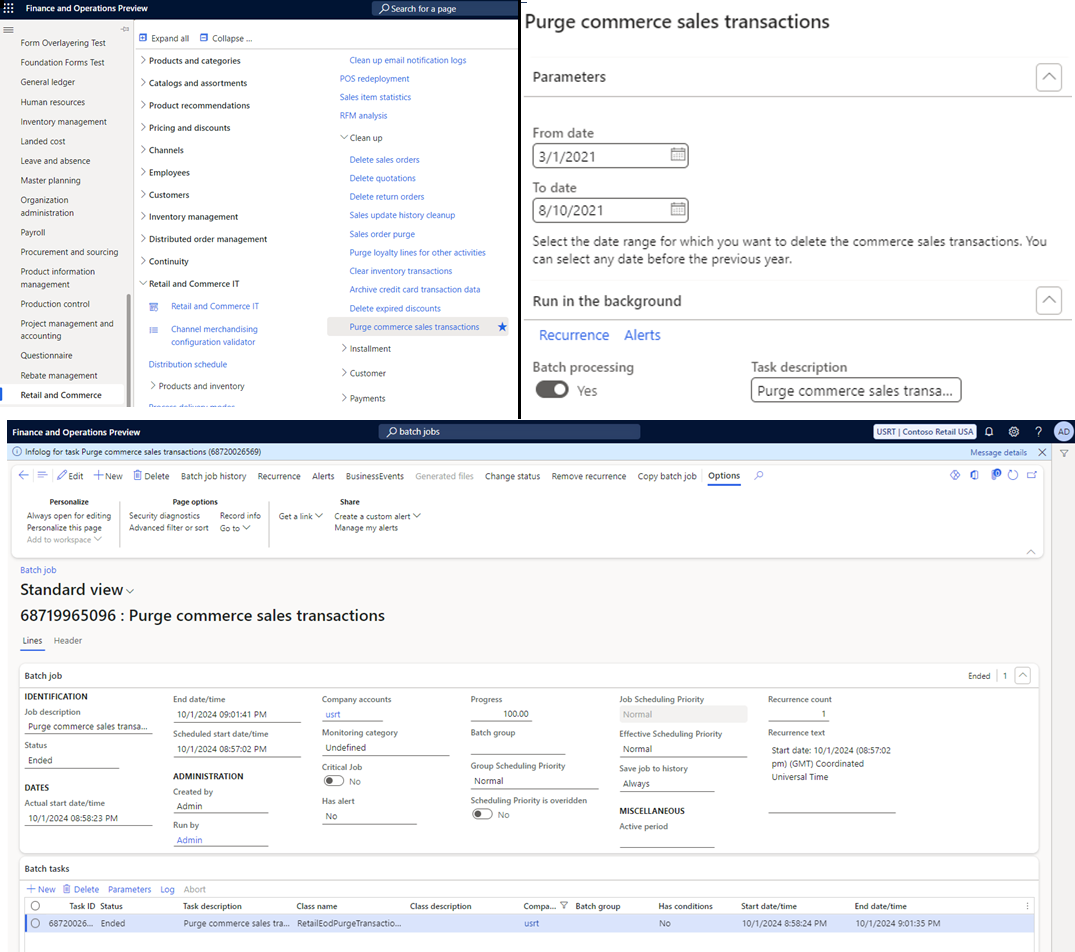
The following image shows an example of the Purge commerce sales transactions dialog box, the navigation that is used to open it, and the details of the purge batch job that runs.
Purge only log and error files
With Commerce version 10.0.46, Microsoft enables an additional configuration named Only delete logs and error files on the Purge commerce sales transaction dialog. If this configuration is enabled, then the system only deletes the log and error files that include the following files:
- RetailEodStatementControllerLog
- RetailEodStatementEventLog
- RetailEodTransactionError
Tables purged by the Purge commerce sales transactions job
If the Only delete logs and error files configuration isn't selected, then the Purge Commerce sales transactions job deletes the content from the following tables:
- RetailTransactionTable
- RetailTransactionCashManagementTrans
- RetailTransactionFiscalCustomer
- RetailTransactionSupplementaryInvoice
- RetailTransactionTable_RU
- RetailTransactionBankedTenderTrans
- RetailTransactionValidationError
- RetailTransactionTenderDeclarationTrans
- RetailTransactionTaxMeasure
- RetailTransactionSalesTrans
- RetailTransactionPaymentTrans
- RetailTransactionPaymentTrans_BR
- RetailTransactionSafeTenderTrans
- RetailTransactionPaymentRefundableAmounts
- RetailTransactionAdditionalAddressTrans
- RetailTransactionAddressTrans
- RetailTransactionAffiliationTrans
- RetailTransactionAttributeTrans
- RetailTransactionChargeTaxMeasure
- RetailTransactionChargeTaxTrans
- RetailTransactionChargeTaxTransGTE
- RetailTransactionCustomerAccountDepositTrans
- RetailTransactionDiscountTrans
- RetailTransactionFiscalTrans
- RetailTransactionFiscalTransExtendedData
- RetailTransactionIncomeExpenseTrans
- RetailTransactionInfocodeTrans
- RetailTransactionKitsDisassemblyTrans
- RetailTransactionLoyaltyRewardPointTrans
- RetailTransactionMarkupTrans
- RetailTransactionNoteTrans
- RetailTransactionOrderInvoiceTrans
- RetailTransactionTaxTrans_IN
- RetailTransactionTaxTrans
- RetailTransactionTaxTransGTE
- RetailEodStatementControllerLog
- RetailEodStatementEventLog
- RetailEodTransactionAggregationHeader
- RetailEodTransactionAggregationTrans
- RetailEodTransactionError
- RetailEodTransactionBankedTenderTrans
- RetailEodTransactionIncomeExpenseTrans
- RetailEodTransactionInfocodeTrans
- RetailEodTransactionOrderInvoiceTrans
- RetailEodTransactionPaymentTrans
- RetailEodTransactionSafeTenderTrans
- RetailEodTransactionSalesTrans
- RetailEodTransactionTable
- RetailEodTransactionTenderDeclarationTrans
- RetailStatementJour
- RetailStatementTrans
- RetailStatementVoucher
Note
There are plans to add two more tables (RetailTransactionPriceTrans and RetailReceiptsContent) to the list in upcoming releases.