Note
Access to this page requires authorization. You can try signing in or changing directories.
Access to this page requires authorization. You can try changing directories.
Note
This article is only applicable for Independent Publishers intending to certify custom connectors in Azure Logic Apps, Microsoft Power Automate, Microsoft Power Apps, and Microsoft Copilot Studio. Before following the steps in this article, read Independent Publisher Certification Process. Ensure you review and complete all the steps in this article to submit connector files to Microsoft.
All Independent publishers need to present verified credentials (VCs) to submit pull requests (PRs) to Microsoft GitHub repositories. If you don't have verified credentials yet, you need to go through a one-time process to set them up. Once you have your verified credentials set up, you can use them to easily verify yourself before you submit PRs to the Power Platform Connectors GitHub repository.
Why do I need verified credentials?
Bad actors are increasingly using sophisticated techniques to commit fraud against Microsoft and its customers and partners. An analysis of recent attacks shows that sophisticated techniques, such as consent phishing, impersonation, and exploitation of process gaps in critical transitions are used to steal customer data, publish malicious apps, and cause damage to Microsoft and its partners directly or indirectly. To prevent these attacks, Microsoft uses VCs from trusted identity verification vendors (IDVs).
How do verified credentials work?
Verified credentials follow an open standard for digital credentials and represent information found in physical credentials, like a passport or license, or data without a physical equivalent, like bank account ownership. Verified credentials offer several advantages over physical ones, especially their digital signatures, which make them tamper resistant and instantly verifiable.
Many IDVs issue verified credentials that validate individuals, organizations, and associations using face recognition technologies—often called a live selfie. The Issuer generates the credential and gives it to the Holder, who stores it for later use. The Holder proves something about themselves by presenting their credentials to a Verifier. If any user attributes change, the system can remove or block the verified credentials to prevent misuse or impersonation.
Use verified credentials to submit PRs
Each time you submit a PR to a Microsoft GitHub repository, you get a QR code to scan with your mobile device. After scanning, the Microsoft Authenticator app opens, and you can select your VC certificate.
Start the process
If you don't already have verified credentials set up with Microsoft when you submit a PR to the Power Platform Independent Publisher's Connectors GitHub repository, the connectors certification team starts the one-time, verified credential setup process. Be sure to carefully follow all the steps in this section to get your verified credentials set up.
Fill out form
The Microsoft certification team sends an email to the email account you have registered in GitHub. The email provides a link to a form for you to fill out.
Fill out and submit the form provided by the Microsoft certification team. You need to ensure that the information you provide in the form and your GitHub profile match your government identification. You need to provide:
- First name
- Last name
- Email address
- Country or Region
- Zip or postal code
- Street address
- City
- State or Province
After the connector certification team receives your completed form, they initiate the verified credentials request process. You'll receive an email from Account No Reply maccount@microsoft.com with a link to start the verification process.
Open the link in a private window browser to start the verification process with the Microsoft IDV, AU10TIX.
Start the verification process with AU10TIX
- For the Legacy version, select Start.

- Select LET'S BEGIN.

- Enter the same email ID that is linked with your GitHub account.

- Check your email for a verification email from AU10TIX. This email includes the PIN code you need to enter.

- Enter your phone number.

- Prepare your government issued identification and select START.

- Scan the QR code on the screen with your mobile camera.

- Make sure you have your documentation ready, and select Start on your mobile device.

- Select Allow so your browser has access to the camera and then select Continue.

- Take a picture of your document and select Continue.

- View the image of your document and decide if you're happy with the results or if you want to retake it. If you're happy with the results, select Continue. If you want to retake the picture, select Retake.

- Take a picture of yourself. Make sure the lighting in the room is good and that you remove glasses and face masks. Select Continue when you are ready for the next step.

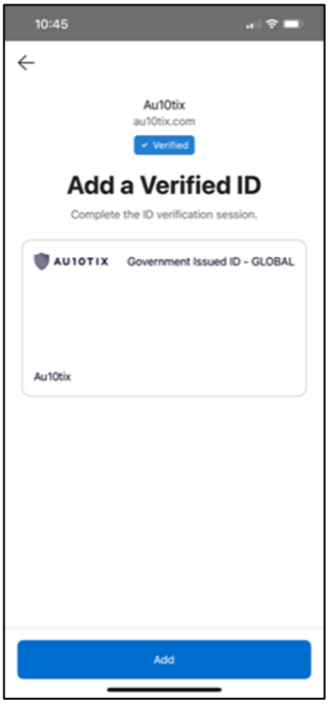
- After verification completes successfully, select Open Authenticator

- Select Add to add your verified ID to the Microsoft Authenticator app.
FAQs
Can I use an existing verified credential (VC)?
Yes, you can use an existing VC from a Microsoft Partner Center preferred vendor.
Which vendors can I use to complete the identity verification?
Currently, Microsoft partners with AU10TIX to set up VCs.
What do I need to complete the verification process?
A government issued ID such as passport or driver's license.
A GitHub profile that matches your government issued ID.
Up-to-date email
- The connector certification team sends an email to the email account associated with your GitHub profile.
- AU10TIX sends an email for PIN verification.
A mobile device (iOS or Android) with the Microsoft Authenticator app installed.
What email should I provide the IDV, AU10TIX?
Provide the email associated with your GitHub profile. The email address is used for PIN verification.
How long does the identity verification process take?
You should dedicate 15 minutes to completing the VC setup process.
How long do I have to complete the verification process?
You have thirty days to complete the verification process.
Does an ID verifier (IDV) store my personal data?
Microsoft requires that its trusted ID verifiers adhere to privacy policies and that your data is safely handled and disposed of.
What if my company doesn't allow me to use a personal mobile device or issued a corporate mobile device to me?
Work with your IT and governance departments on corporate policy.
Does a VC expire?
Yes, a verified credential certificate expires either at one year or on the expiration date of the government-issued document, whichever comes first. The Microsoft Authenticator app shows the certificate expiration date.
Learn more
Learn more about the Independent publisher certification process.
Learn more about connector data protection in Vet with data protection in connectors.