Note
Access to this page requires authorization. You can try signing in or changing directories.
Access to this page requires authorization. You can try changing directories.
Important
This feature is in Public Preview.
User-defined functions (UDFs) in Unity Catalog extend SQL and Python capabilities within Azure Databricks. They allow custom functions to be defined, used, and securely shared and governed across computing environments.
Python UDFs registered as functions in Unity Catalog differ in scope and support from PySpark UDFs scoped to a notebook or SparkSession. See User-defined scalar functions - Python.
See CREATE FUNCTION (SQL and Python) for complete SQL language reference.
Requirements
To use UDFs in Unity Catalog, you must meet the following requirements:
- To use Python code in UDFs registered in Unity Catalog, you must use a serverless or pro SQL warehouse or a cluster running Databricks Runtime 13.3 LTS or above.
- If a view includes a Unity Catalog Python UDF, it fails on classic SQL warehouses.
Creating UDFs in Unity Catalog
To create a UDF in Unity Catalog, users need USAGE and CREATE permission on the schema and USAGE permission on the catalog. See Unity Catalog for more details.
To run a UDF, users need EXECUTE permission on the UDF. Users also need USAGE permission on the schema and catalog.
To create and register a UDF in a Unity Catalog schema, the function name should follow the format catalog.schema.function_name. Alternatively, you can select the correct catalog and schema in the SQL Editor.
In this case, your function name should not have catalog.schema prepended to it:

The following example registers a new function to the my_schema schema in the my_catalog catalog:
CREATE OR REPLACE FUNCTION my_catalog.my_schema.calculate_bmi(weight DOUBLE, height DOUBLE)
RETURNS DOUBLE
LANGUAGE SQL
RETURN
SELECT weight / (height * height);
Python UDFs for Unity Catalog use statements offset by double dollar signs ($$). You must specify a data type mapping. The following example registers a UDF that calculates body mass index:
CREATE OR REPLACE FUNCTION my_catalog.my_schema.calculate_bmi(weight_kg DOUBLE, height_m DOUBLE)
RETURNS DOUBLE
LANGUAGE PYTHON
AS $$
return weight_kg / (height_m ** 2)
$$;
You can now use this Unity Catalog function in your SQL queries or PySpark code:
SELECT person_id, my_catalog.my_schema.calculate_bmi(weight_kg, height_m) AS bmi
FROM person_data;
See Row filter examples and Column mask examples for more UDF examples.
Extend UDFs using custom dependencies
Important
This feature is in Public Preview.
Extend the functionality of Unity Catalog Python UDFs beyond the Databricks Runtime environment by defining custom dependencies for external libraries.
Install dependencies from the following sources:
- PyPI packages
- Files stored in Unity Catalog volumes
The user invoking the UDF must have
READ VOLUMEpermissions on the source volume. - Files available at public URLs Your workspace network security rules must allow access to public URLs.
Note
To configure network security rules to allow access to public URLs from a serverless SQL warehouse, see Validate with Databricks SQL.
- Serverless SQL warehouses require the Public Preview feature Enable networking for UDFs in Serverless SQL Warehouses to be enabled in your workspace's Previews page to access the internet for custom dependencies.
Custom dependencies for Unity Catalog UDFs are supported on the following compute types:
- Serverless notebooks and jobs
- All-purpose compute using Databricks Runtime version 16.2 and above
- Pro or serverless SQL warehouse
Use the ENVIRONMENT section of the UDF definition to specify dependencies:
CREATE OR REPLACE FUNCTION my_catalog.my_schema.mixed_process(data STRING)
RETURNS STRING
LANGUAGE PYTHON
ENVIRONMENT (
  dependencies = '["simplejson==3.19.3", "/Volumes/my_catalog/my_schema/my_volume/packages/custom_package-1.0.0.whl", "https://my-bucket.s3.amazonaws.com/packages/special_package-2.0.0.whl?Expires=2043167927&Signature=abcd"]',
  environment_version = 'None'
)
AS $$
import simplejson as json
import custom_package
return json.dumps(custom_package.process(data))
$$;
The ENVIRONMENT section contains the following fields:
| Field | Description | Type | Example usage |
|---|---|---|---|
dependencies |
A list of comma-separated dependencies to install. Each entry is a string that conforms to the pip Requirements File Format. | STRING |
dependencies = '["simplejson==3.19.3", "/Volumes/catalog/schema/volume/packages/my_package-1.0.0.whl"]'dependencies = '["https://my-bucket.s3.amazonaws.com/packages/my_package-2.0.0.whl?Expires=2043167927&Signature=abcd"]' |
environment_version |
Specifies the serverless environment version in which to run the UDF. Currently, only the value None is supported. |
STRING |
environment_version = 'None' |
Use Unity Catalog UDFs in PySpark
from pyspark.sql.functions import expr

result = df.withColumn("bmi", expr("my_catalog.my_schema.calculate_bmi(weight_kg, height_m)"))
display(result)
Upgrade a session-scoped UDF
Note
Syntax and semantics for Python UDFs in Unity Catalog differ from Python UDFs registered to the SparkSession. See user-defined scalar functions - Python.
Given the following session-based UDF in a Azure Databricks notebook:
from pyspark.sql.functions import udf
from pyspark.sql.types import StringType

@udf(StringType())
def greet(name):
    return f"Hello, {name}!"

# Using the session-based UDF
result = df.withColumn("greeting", greet("name"))
result.show()
To register this as a Unity Catalog function, use a SQL CREATE FUNCTION statement, as in the following example:
CREATE OR REPLACE FUNCTION my_catalog.my_schema.greet(name STRING)
RETURNS STRING
LANGUAGE PYTHON
AS $$
return f"Hello, {name}!"
$$
Share UDFs in Unity Catalog
Permissions for UDFs are managed based on the access controls applied to the catalog, schema, or database where the UDF is registered. See Manage privileges in Unity Catalog for more information.
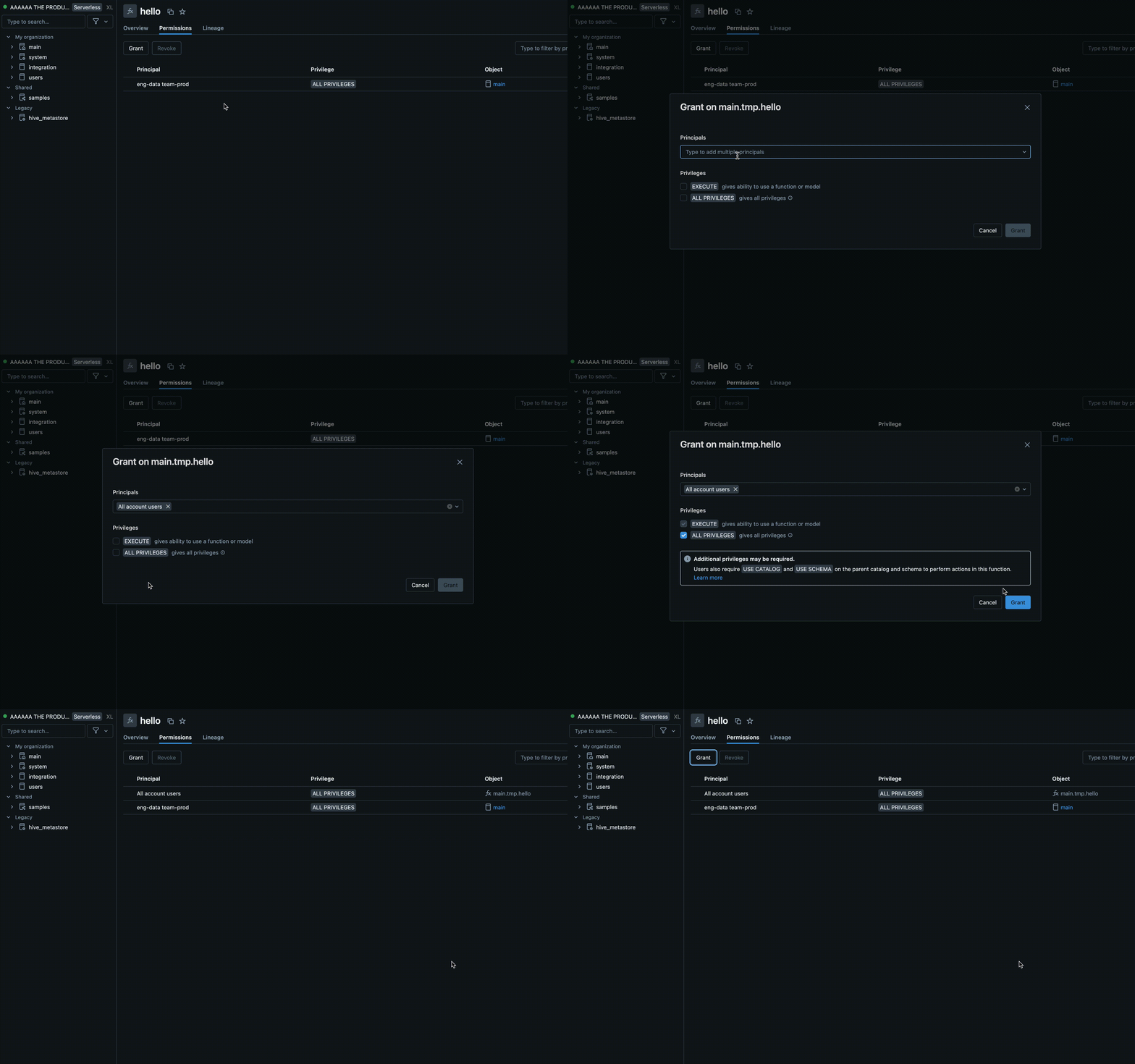
Use the Azure Databricks SQL or the Azure Databricks workspace UI to give permissions to a user or group (recommended).
Permissions in the workspace UI
- Find the catalog and schema where your UDF is stored and select the UDF.
- Look for a Permissions option in the UDF settings. Add users or groups and specify the type of access they should have, such as EXECUTE or MANAGE.
Permissions using Azure Databricks SQL
The following example grants a user the EXECUTE permission on a function:
GRANT EXECUTE ON FUNCTION my_catalog.my_schema.calculate_bmi TO `user@example.com`;
To remove permissions, use the REVOKE command as in the following example:
REVOKE EXECUTE ON FUNCTION my_catalog.my_schema.calculate_bmi FROM `user@example.com`;
Best practices for UDFs
For UDFs to be accessible to all users, we recommend creating a dedicated catalog and schema with appropriate access controls.
For team-specific UDFs, use a dedicated schema within the team catalog for storage and management.
Databricks recommends you include the following information in the UDF docstring:
- The current version number
- A changelog to track modifications across versions
- The UDF purpose, parameters, and return value
- An example of how to use the UDF
Here is an example of a UDF following best practices:
CREATE OR REPLACE FUNCTION my_catalog.my_schema.calculate_bmi(weight_kg DOUBLE, height_m DOUBLE)
RETURNS DOUBLE
COMMENT "Calculates Body Mass Index (BMI) from weight and height."
LANGUAGE PYTHON
DETERMINISTIC
AS $$
 """
Parameters:
calculate_bmi (version 1.2):
- weight_kg (float): Weight of the individual in kilograms.
- height_m (float): Height of the individual in meters.

Returns:
- float: The calculated BMI.

Example Usage:

SELECT calculate_bmi(weight, height) AS bmi FROM person_data;

Change Log:
- 1.0: Initial version.
- 1.1: Improved error handling for zero or negative height values.
- 1.2: Optimized calculation for performance.

 Note: BMI is calculated as weight in kilograms divided by the square of height in meters.
 """
if height_m <= 0:
 return None  # Avoid division by zero and ensure height is positive
return weight_kg / (height_m ** 2)
$$;
Environment isolation
Note
Shared isolation environments require Databricks Runtime 18.0 and above. In earlier versions, all Unity Catalog Python UDFs run in strict isolation mode.
Unity Catalog Python UDFs with the same owner and session can share an isolation environment by default. This improves performance and reduces memory usage by reducing the number of separate environments that need to be launched.
Strict isolation
To ensure a UDF always runs in its own, fully isolated environment, add the STRICT ISOLATION characteristic clause.
Most UDFs don't need strict isolation. Standard data processing UDFs benefit from the default shared isolation environment and run faster with lower memory consumption.
Add the STRICT ISOLATION characteristic clause to UDFs that:
- Run input as code using
eval(),exec(), or similar functions. - Write files to the local file system.
- Modify global variables or system state.
- Access or modify environment variables.
The following code shows an example of a UDF that should be run using STRICT ISOLATION. This UDF executes arbitrary Python code, so it might alter the system state, access environment variables, or write to the local file system. Using the STRICT ISOLATION clause helps prevent interference or data leaks across UDFs.
CREATE OR REPLACE TEMPORARY FUNCTION run_python_snippet(python_code STRING)
RETURNS STRING
LANGUAGE PYTHON
STRICT ISOLATION
AS $$
import sys
from io import StringIO

# Capture standard output and error streams
captured_output = StringIO()
captured_errors = StringIO()
sys.stdout = captured_output
sys.stderr = captured_errors

try:
    # Execute the user-provided Python code in an empty namespace
    exec(python_code, {})
except SyntaxError:
    # Retry with escaped characters decoded (for cases like "\n")
    def decode_code(raw_code):
        return raw_code.encode('utf-8').decode('unicode_escape')
    python_code = decode_code(python_code)
    exec(python_code, {})

# Return everything printed to stdout and stderr
return captured_output.getvalue() + captured_errors.getvalue()
$$
Set DETERMINISTIC if your function produces consistent results
Add DETERMINISTIC to your function definition if it produces the same outputs for the same inputs. This allows query optimizations to improve performance.
By default, Batch Unity Catalog Python UDFs are assumed to be non-deterministic unless explicitly declared. Examples of non-deterministic functions include generating random values, accessing current times or dates, or making external API calls.
See CREATE FUNCTION (SQL and Python)
UDFs for AI agent tools
Generative AI agents can use Unity Catalog UDFs as tools to perform tasks and execute custom logic.
See Create AI agent tools using Unity Catalog functions.
UDFs for accessing external APIs
You can use UDFs to access external APIs from SQL. The following example uses the Python requests library to make an HTTP request.
Note
Python UDFs allow TCP/UDP network traffic over ports 80, 443, and 53 when using serverless compute or compute configured with standard access mode.
CREATE FUNCTION my_catalog.my_schema.get_food_calories(food_name STRING)
RETURNS DOUBLE
LANGUAGE PYTHON
AS $$
import requests

api_url = f"https://example-food-api.com/nutrition?food={food_name}"
response = requests.get(api_url)

if response.status_code == 200:
   data = response.json()
   # Assume the API returns a JSON object with a 'calories' field
   calories = data.get('calories', 0)
   return calories
else:
   return None  # API request failed

$$;
UDFs for security and compliance
Use Python UDFs to implement custom tokenization, data masking, data redaction, or encryption mechanisms.
The following example masks the identity of an email address while maintaining length and domain:
CREATE OR REPLACE FUNCTION my_catalog.my_schema.mask_email(email STRING)
RETURNS STRING
LANGUAGE PYTHON
DETERMINISTIC
AS $$
parts = email.split('@', 1)
if len(parts) == 2:
  username, domain = parts
else:
  return None
masked_username = username[0] + '*' * (len(username) - 2) + username[-1]
return f"{masked_username}@{domain}"
$$
The following example applies this UDF in a dynamic view definition:
-- First, create the view
CREATE OR REPLACE VIEW my_catalog.my_schema.masked_customer_view AS
SELECT
  id,
  name,
  my_catalog.my_schema.mask_email(email) AS masked_email
FROM my_catalog.my_schema.customer_data;

-- Now you can query the view
SELECT * FROM my_catalog.my_schema.masked_customer_view;
+---+------------+------------------------+------------------------+
| id|        name|                   email|           masked_email |
+---+------------+------------------------+------------------------+
|  1|    John Doe|   john.doe@example.com |  j*******e@example.com |
|  2| Alice Smith|alice.smith@company.com |a**********h@company.com|
|  3|   Bob Jones|    bob.jones@email.org |   b********s@email.org |
+---+------------+------------------------+------------------------+
Limitations
- You can define any number of Python functions within a Python UDF, but all must return a scalar value.
- Python functions must handle NULL values independently, and all type mappings must follow Azure Databricks SQL language mappings.
- If no catalog or schema is specified, Python UDFs are registered to the current active schema.
- Python UDFs execute in a secure, isolated environment and do not have access to file systems or internal services.
- You cannot call more than five UDFs per query.