Note
Access to this page requires authorization. You can try signing in or changing directories.
Access to this page requires authorization. You can try changing directories.
Many organizations must comply with industry or regional regulations before adopting Azure cloud services. Each regulation defines compliance domains and specific controls. For example, CMMC L3 AC 1.001 refers to the Access Control (AC) domain and control ID 1.001 in the Cybersecurity Maturity Model Certification (CMMC) framework. As a best practice, map your required compliance controls to the Microsoft cloud security benchmark (MCSB). Identify any custom controls that MCSB does not cover.
MCSB provides a list of built-in policies and policy initiative GUIDs (Globally Unique Identifiers) that address required controls. For controls not covered by MCSB, follow the control mapping guidance to build custom policies and initiatives using the provided step-by-step process.
Mapping your required controls to MCSB can speed up your secure Azure onboarding process. MCSB offers a standard set of cloud-focused technical security controls based on widely used compliance frameworks. Examples include the National Institute of Standards and Technology (NIST), Center for Internet Security (CIS), and Payment Card Industry (PCI). Azure provides built-in regulatory compliance initiatives. To find initiatives for a specific compliance domain, see Regulatory compliance built-in initiatives.
Note
Control mappings between MCSB and industry benchmarks, such as CIS, NIST, and PCI, show that a specific Azure feature can fully or partially address a control requirement. However, using these features does not guarantee full compliance with the corresponding controls in these industry benchmarks.
The following diagram illustrates the control mapping process flow:

Steps to map security controls in Azure
- Identify the required controls.
- Map required controls to MCSB.
- Identify controls not mapped with MCSB and their respective policies.
- Perform platform and service-level assessment.
- Implement guardrails with policy initiatives using Azure landing zone tooling, native tooling, or third-party tooling.
Tip
Review the guidance on how to tailor the Azure landing zone architecture to support your control mapping requirements.
1. Identify the required controls
Gather all existing and required compliance controls from your security team. If no list exists, document the control requirements in an Excel spreadsheet. Use the format below as a guide. Your list may include controls from one or more compliance frameworks.
A sample of formalized controls list.
2. Map controls to Microsoft cloud security benchmark and create custom controls
For each control you capture, use the correct control title, domain category, and description to identify related controls. Align each control’s intent as closely as possible. Note any differences or gaps in your spreadsheet.
You can also use common frameworks that map to both your organization’s controls and MCSB, if available. For example, if both your controls and MCSB map to NIST 800-53 Revision 4 or CIS 7.1, you can join the data sets using that shared framework. Find intermediate common frameworks in the resources section.

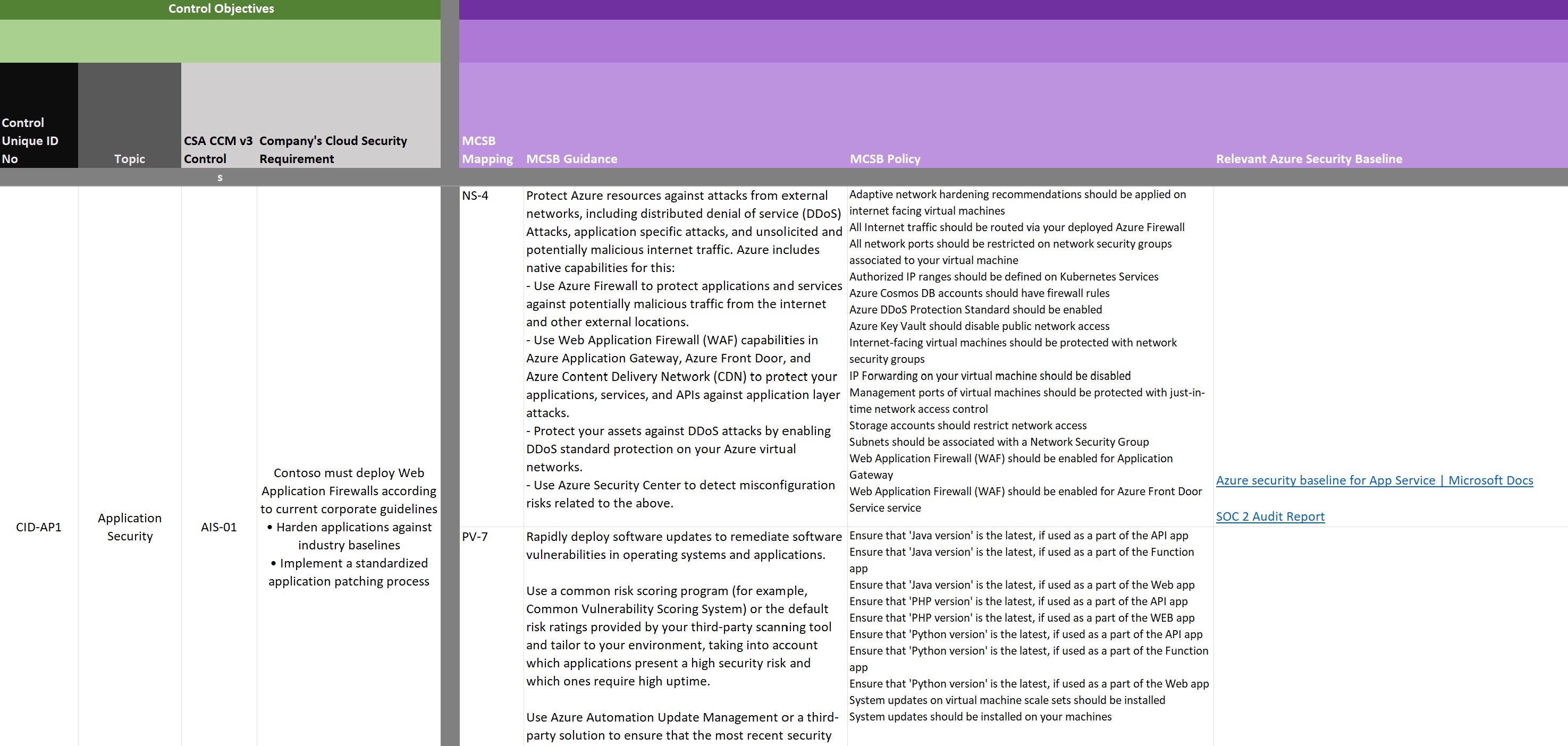
Single control mapping example: Your organization's control objectives
The table above shows one of the unique control objectives with key words highlighted.
In this example, review the categorization of a control labeled ‘Application Security’ to identify it as an application-related control. The requirement is to implement application firewalls and to harden and patch applications. When you review MCSB controls and guidance, you may find several controls that apply and map to this requirement.
To quickly search a specific version of MCSB, download the Excel files for each release. Search these files by control ID or keywords in the description. Use this step to identify and map controls that MCSB covers.
3. Identify controls not mapped with Microsoft cloud security benchmark and respective policies
Mark any controls that do not map directly as needing mitigation. Develop a custom policy or automation script for these controls during the guardrail implementation process.
Tip
AzAdvertizer is a community-driven tool endorsed by the Cloud Adoption Framework. Use it to discover built-in policies from Azure landing zones or from the community Azure Policy repository in one place.
4. Perform platform and service-level assessment
After you map your controls and objectives to MCSB and gather supporting information on responsibility, guidance, and monitoring, your IT security office or supporting organization should review all information in an official platform assessment.
This platform assessment determines whether MCSB meets the minimum requirements for use and satisfies all security and compliance needs imposed by regulations.
If you identify gaps, you can still use MCSB, but you may need to develop mitigating controls until you close these gaps or the benchmark releases updates to address them. You can also map custom controls by creating a policy definition and, if needed, add them to an initiative definition.
Checklists for approval
Security team has approved the Azure platform for usage.
You'll need to join an individual Microsoft cloud security benchmark service baseline Excel to the previously completed, platform-level control mappings.
- Add in columns to accommodate the assessment like: coverage, enforcement, effects allowed.
Perform a line-by-line analysis of the resulting service baseline assessment template:
For each control objective, indicate:
- If it can be met by the service or a risk.
- Risk value, if any.
- Status of review for that line item.
- Needed mitigating controls, if any.
- What Azure Policy can enforce/monitor the control.
Where there are gaps in monitoring or enforcement for the service and control:
- Report to the Microsoft cloud security benchmark team to close gaps in content, monitoring, or enforcement.
For any areas that don't meet your requirements, note the risk involved if you choose to exempt that requirement, the impact, and if it's acceptable to approve or if you're blocked due to the gap.
Service status is determined:
- Either the service meets all requirements, or that the risk is acceptable and is placed on an allowlist to be used after guardrails are in place.
- OR, the service gaps are too large / risk is too large and service is placed on a blocklist. It can't be used until gaps are closed by Microsoft.
Inputs - platform level
- Service assessment template (Excel)
- Control objectives to Microsoft cloud security benchmark mapping
- Target service
Outputs - platform level
- Completed service assessment (Excel)
- Mitigating controls
- Gaps
- Approval/non-approval for service usage
After your internal security or audit team approves that the platform and core services meet their needs, implement the agreed monitoring and guardrails. If you identified mitigating controls that extend beyond MCSB, implement built-in controls or Azure Policy using policy definitions. Add these controls to an initiative definition if needed.
Checklist - service level
- Summarize the policies that were identified as required as an output of the platform assessment and service assessments.
- Develop any needed custom policy definitions to support mitigating controls/gaps.
- Create custom policy initiative.
- Assign the policy initiative with Azure landing zone tooling, native tooling, or third-party tooling.
Inputs - service level
- Completed service assessment (Excel)
Outputs - service level
- Custom policy initiative
5. Implement guardrails using Azure landing zone or native tools
The following sections describe how to identify, map, and implement regulatory compliance controls as part of an Azure landing zone deployment. This deployment includes policies aligned with MCSB for platform-level security controls.
Tip
When you use Azure landing zone accelerators—such as the Portal, Bicep, or Terraform—the deployment assigns MCSB policy initiative to the Intermediate Root Management Group by default.
Learn more about policies assigned as part of an Azure landing zone accelerator deployment.
Guidance for implementing policy in Azure landing zones
Depending on your control objectives, you may need to create custom policy definitions, policy initiative definitions, and policy assignments.
Refer to the following guidance for each Azure landing zone accelerator implementation option.
Azure landing zone accelerator portal
When using the Azure landing zone portal-based experience:
- Create custom security policies in Microsoft Defender for Cloud
- Tutorial: Create a custom policy definition
- Assign Azure Policy or policy initiatives
Azure Resource Manager with AzOps
When using the Resource Manager templates with the AzOps Accelerator, refer to the deployment article to learn how to operate the Azure platform using infrastructure as code.
Terraform module
When using the Azure landing zones Terraform module, refer to the repository wiki for guidance on how to manage additional policy definitions and assignments.
- Adding Custom Azure Policy definitions and assignments
- Assigning a built-in Azure Policy
- Expand built-in archetype definitions
Bicep
When using the Azure landing zones Bicep implementation, learn how to create your own policy definitions and assignments.
Implement custom policies when not using an Azure landing zones implementation
Azure portal
When using the Azure portal, refer to the following articles.
- Create custom security policies in Microsoft Defender for Cloud
- Create a custom policy definition
- Create and manage policies to enforce compliance
- Assign policy initiatives
Azure Resource Manager templates
When using the Resource Manager templates, refer to the following articles.
- Create a custom policy definition
- Assign policy initiatives
- Create a policy assignment to identify non-compliant resources by using an ARM template
- Bicep and Resource Manager policy definition template reference
- Bicep and Resource Manager set (initiative) template reference
- Bicep and Resource Manager policy assignment template reference
Terraform
When using Terraform, refer to the following articles.
- Adding custom Azure policy definitions and initiatives
- Adding Azure Policy set Definition
- Assigning management group policy
- Assigning Azure Policy or policy initiative
Bicep
When using the Bicep templates, refer to the following articles.
- Quickstart: Create a policy assignment to identify non-compliant resources by using a Bicep file
- Bicep and Resource Manager policy definition template reference
- Bicep and Resource Manager policy set (initiative) template reference
- Bicep and Resource Manager policy assignment template reference
Use Microsoft Defender for Cloud to monitor compliance
Microsoft Defender for Cloud continuously compares your resource configurations with requirements in industry standards, regulations, and benchmarks. The regulatory compliance dashboard shows your compliance posture. Learn more about improving your regulatory compliance.
Frequently asked questions
How do I onboard control objectives if my framework is not mapped to the Microsoft cloud security benchmark?
Microsoft provides cloud security benchmark (MCSB) mappings to many leading industry frameworks. If your required controls are not covered, perform a manual mapping. Follow the steps in this article for manual control mapping.
Example: If you need to meet Canada Federal Protected B (PBMM) compliance and the Microsoft cloud security benchmark does not yet map to PBMM, find a shared framework such as NIST Special Publication (SP) 800-53 Revision 4. If both PBMM and MCSB v2 map to NIST SP 800-53 R4, use this common framework to identify the recommendations and guidance you need to follow in Azure.
How do I address control objectives not covered by the Microsoft cloud security benchmark?
MCSB focuses on Azure technical controls. It does not include non-technical objectives, such as training, or controls not directly related to technical security, such as data center security. Mark these items as Microsoft’s responsibility, and use evidence from MCSB content or Microsoft audit reports to demonstrate compliance. If you determine that an objective is a technical control, create a mitigating control in addition to the base controls for tracking. You can also send a request to MCSBteam@microsoft.com to address missing controls in future releases.