Note
Access to this page requires authorization. You can try signing in or changing directories.
Access to this page requires authorization. You can try changing directories.
Azure Event Hubs
Azure Data Lake
Azure Databricks
This solution uses an on-premises instance of Qlik to replicate on-premises data sources to Azure in real time.
Note
Pronounce "Qlik" like "click."
Apache® and Apache Kafka® are either registered trademarks or trademarks of the Apache Software Foundation in the United States and/or other countries. No endorsement by The Apache Software Foundation is implied by the use of these marks.
Architecture
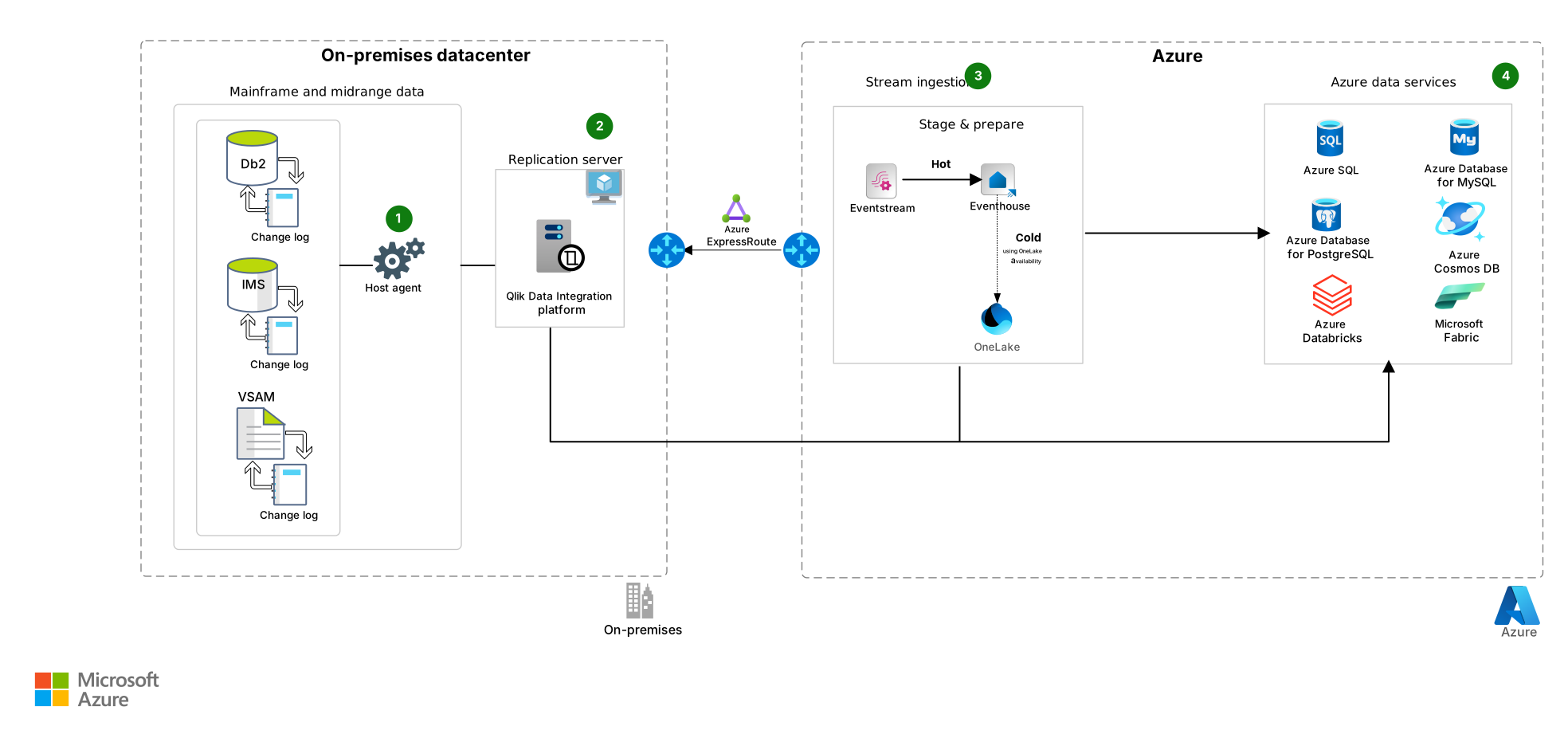
Download a Visio file of this architecture.
Workflow
Host agent: The host agent on the on-premises system captures change log information from Db2, Information Management System (IMS), and Virtual Storage Access Method (VSAM) data stores and passes it to the Qlik replication server.
Replication server: The Qlik replication server software ingests the change log information to the eventstream. In this example, Qlik is on-premises, but you can deploy it on a virtual machine in Azure.
Stream ingestion: The eventstream and eventhouse handle data staging and preparation.
- The eventstream routes the real-time change log data from Qlik replication server. It sends the data via the hot path to the eventhouse to enable near real-time analytics.
- The eventhouse acts as the real-time analytical store and stores the change log data in Fabric for querying and analytics.
- OneLake is the unified data lake for historical analysis and large-scale data preparation for advanced analytics via the cold path. It stores curated or replicated change log data from the eventhouse (through OneLake availability) or ingests directly from the eventstream.
Azure data services: Azure provides the following efficient data storage services and data processing services.
Relational database services:
- Azure SQL Database
- Azure Database for PostgreSQL
- Azure Database for MySQL
There are many factors to consider when you choose a data storage service. Consider the type of workload, cross-database queries, two-phase commit requirements, the ability to access the file system, amount of data, required throughput, and latency.
Azure Cosmos DB: Azure Cosmos DB is a NoSQL database that provides quick response, automatic scalability, and guaranteed speed at any scale.
Azure Databricks: Azure Databricks processes the change log data and updates the corresponding files on Azure.
Microsoft Fabric: Fabric is an all-in-one analytics solution for enterprises. It covers everything from data movement to data science, real-time analytics, and business intelligence. It provides a comprehensive suite of services, including data lake, data engineering, and data integration.
Components
This architecture consists of several Azure services and is divided into four categories of resources: networking and identity, application, storage, and monitoring. The following sections describe the services for each resource and their roles.
Networking
When you design application architecture, it's crucial to prioritize networking and identity components to help ensure security, performance, and manageability during interactions over the public internet or private connections.
- Azure ExpressRoute is a dedicated, private connection between your on-premises infrastructure and Microsoft cloud services. In this architecture, it ensures secure, high-throughput connectivity to Azure and Microsoft 365 and bypasses the public internet for improved reliability and performance.
Storage and databases
Azure and Fabric provide managed services that enable scalable cloud storage and managed databases for flexible and intelligent data management.
Azure Databricks is a cloud-based data engineering and analytics platform built on Apache Spark. It can process and transform massive quantities of data. You can explore the data by using machine learning models. Jobs can be written in R, Python, Java, Scala, and Spark SQL. In this architecture, Azure Databricks transforms and analyzes large volumes of ingested data by using machine learning models. It also supports development in R, Python, Java, Scala, and Spark SQL.
OneLake is a unified, logical data lake that can serve an entire organization. Like OneDrive, OneLake includes all Fabric tenants and provides a single place for all analytics data. In this architecture, OneLake serves as the persistent storage layer for processed change log data from on-premises systems.
Azure Cosmos DB is a globally distributed NoSQL database service. In this architecture, it stores nontabular data migrated from mainframe systems and supports low-latency access across regions.
Azure Database for MySQL is a fully managed MySQL database service designed for scalability and high availability. In this architecture, it supports open-source relational workloads.
Azure Database for PostgreSQL is a fully managed, intelligent, and scalable PostgreSQL that has native connectivity with Azure services. In this architecture, it hosts relational data that benefits from advanced indexing, analytics, and compatibility with open-source tools.
Azure SQL is a family of cloud-based SQL database services that support migration, modernization, and development. This family includes the following offerings:
Azure SQL Edge is a lightweight SQL engine optimized for IoT and edge deployments. In this architecture, it processes and stores data close to devices in disconnected or latency-sensitive environments.
Azure SQL Managed Instance is a fully managed SQL Server instance with near 100% compatibility with on-premises SQL Server. In this architecture, it hosts migrated databases that benefit from simplified management and built-in high availability.
SQL Database is a fully managed relational database optimized for scalability and performance. In this architecture, it supports modernized workloads with elastic compute and built-in intelligence.
SQL Server on Azure Virtual Machines is a full-featured SQL Server instance that runs on Azure infrastructure. In this architecture, it supports legacy workloads that require full control over the operating system and database engine.
Monitoring
Monitoring tools provide comprehensive data analysis and valuable insights into application performance.
Application Insights is a feature of Azure Monitor that provides deep telemetry for application performance, availability, and usage. In this architecture, it monitors application behavior, detects anomalies, and supports distributed tracing to ensure reliability across services.
Azure Monitor is a comprehensive platform for collecting, analyzing, and acting on telemetry from Azure and on-premises environments. In this architecture, it serves as the central observability layer, which enables proactive monitoring and diagnostics across infrastructure and applications.
- Log Analytics is a query tool within Azure Monitor that enables deep analysis of log data using a powerful query language. In this architecture, it supports diagnostics, custom dashboards, and operational insights by joining and aggregating data across multiple sources.
Alternatives
The preceding diagram shows Qlik installed on-premises. This approach is a recommended best practice to keep Qlik close to the on-premises data sources. An alternative is to install Qlik in the cloud on an Azure virtual machine.
Qlik Data Integration can deliver data directly to Azure Databricks without going through Kafka or an event hub.
Qlik Data Integration can't replicate data directly to Azure Cosmos DB, but you can integrate Azure Cosmos DB with an event hub by using event-sourcing architecture.
Scenario details
Many organizations use mainframe and midrange systems to run demanding and critical workloads. Most applications use shared databases, often across multiple systems. In this environment, modernizing to the cloud means that on-premises data must be provided to cloud-based applications. Therefore, data replication becomes an important modernization tactic.
The Qlik Data Integration platform includes Qlik Replicate, which does data replication. It uses change data capture to replicate on-premises data stores in real time to Azure. The change data can come from Db2, IMS, and VSAM change logs. This replication technique eliminates inconvenient batch bulk loads. This solution uses an on-premises instance of Qlik to replicate on-premises data sources to Azure in real time.
Potential use cases
This solution might be appropriate for:
Hybrid environments that require replication of data changes from a mainframe or midrange system to Azure databases.
Online database migration from Db2 to an Azure SQL database with little downtime.
Data replication from various on-premises data stores to Azure for consolidation and analysis.
Considerations
These considerations implement the pillars of the Azure Well-Architected Framework, which is a set of guiding tenets that you can use to improve the quality of a workload. For more information, see Well-Architected Framework.
Reliability
Reliability helps ensure that your application can meet the commitments that you make to your customers. For more information, see Design review checklist for Reliability.
Qlik Data Integration can be configured in a high-availability cluster.
The Azure database services support zone redundancy. You can design them to fail over to a secondary node during a maintenance window or an outage.
Fabric provides regional resiliency through availability zones and supports cross-region recovery.
Security
Security provides assurances against deliberate attacks and the misuse of your valuable data and systems. For more information, see Design review checklist for Security.
ExpressRoute provides a private and efficient connection to Azure from on-premises, but you can use a site-to-site VPN instead.
Azure resources can be authenticated by using Microsoft Entra ID, and permissions are managed through role-based access control.
Azure database services and Fabric support various security options, including the following capabilities:
Data encryption at rest
Dynamic data masking
Always-encrypted databases
For more information, see Azure security documentation and Fabric security documentation.
Cost Optimization
Cost Optimization focuses on ways to reduce unnecessary expenses and improve operational efficiencies. For more information, see Design review checklist for Cost Optimization.
To estimate costs for your implementation, use the Azure pricing calculator and Fabric pricing estimator.
Operational Excellence
Operational Excellence covers the operations processes that deploy an application and keep it running in production. For more information, see Design review checklist for Operational Excellence.
You can combine Application Insights and Log Analytics features to monitor the health of Azure resources. You can set alerts so that you can manage problems proactively.
Fabric enables operational excellence by unifying governance, observability, and resilient engineering patterns. This unification occurs across OneLake, Fabric Data Warehouse, Fabric Data Engineer, Fabric Real-Time Intelligence, and other workloads.
Performance Efficiency
Performance Efficiency refers to your workload's ability to scale to meet user demands efficiently. For more information, see Design review checklist for Performance Efficiency.
Fabric, Azure Databricks, Data Lake Storage, and other Azure database services have autoscaling capabilities. For more information, see Autoscaling.
Contributors
Microsoft maintains this article. The following contributors wrote this article.
Principal authors:
- Nithish Aruldoss | Engineering Architect
- Ashish Khandelwal | Principal Engineering Architecture Manager
Other contributors:
- Dharmendra Keshari | Cloud Solution Architect
To see nonpublic LinkedIn profiles, sign in to LinkedIn.
Next steps
- Qlik Data Integration platform
- Unleash new Azure analytics initiatives (PDF data sheet)
- What is ExpressRoute?
- Event Hubs: A real-time data streaming platform with native Apache Kafka support
- Introduction to Storage
- What is Azure SQL Database?
- Azure Cosmos DB
- Introduction to Application Insights with OpenTelemetry
- Azure Monitor Logs overview
- Log queries in Azure Monitor
- Contact us (select to create email)