Microsoft Teams | Development
Building, integrating, or customizing apps and workflows within Microsoft Teams using developer tools and APIs

This browser is no longer supported.
Upgrade to Microsoft Edge to take advantage of the latest features, security updates, and technical support.
' cx='32' cy='32' r='32' /%3E%3Ctext x='50%25' y='55%25' dominant-baseline='middle' text-anchor='middle' fill='%23FFF' %3ESP%3C/text%3E%3C/svg%3E)
I have created a bot using Azure Bot Service
My bot is available for all the users in the organisation.
I want to know if someone blocked the bot.
Is there any API or any event from the bot to know the user ID if the Bot has been blocked?
Building, integrating, or customizing apps and workflows within Microsoft Teams using developer tools and APIs
Additional features, settings, or issues not covered by specific Microsoft Teams categories
' cx='32' cy='32' r='32' /%3E%3Ctext x='50%25' y='55%25' dominant-baseline='middle' text-anchor='middle' fill='%23FFF' %3EJM%3C/text%3E%3C/svg%3E)
Hi @ShyamParse-6081
Our forum is mainly focused on the general issue of Microsoft Teams troubleshooting. According to your description, your question is related to Teams api development, which is not in our support scope. So I will also add teams-app-dev tag to your thread. Someone who cares about this tag will give you more insights about this issue. Thanks for your understanding and patience!
' cx='32' cy='32' r='32' /%3E%3Ctext x='50%25' y='55%25' dominant-baseline='middle' text-anchor='middle' fill='%23FFF' %3ENM%3C/text%3E%3C/svg%3E)
@ShyamParse-6081 - We are investigating your query. We will get back to you once we have any update.
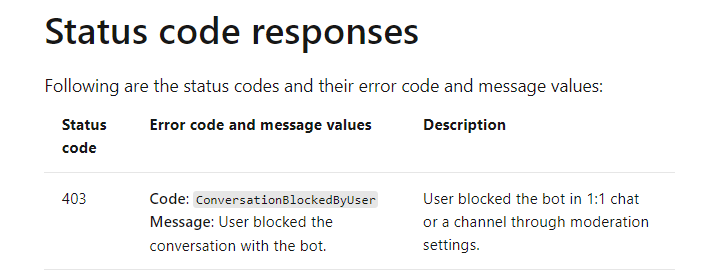
When user send response to the bot status code 403 returns if the bot is blocked by user.
@Shyam Parse - If my answer is helpful for you, you can accept it as an answer. This can be beneficial to other community members. Thank you
' cx='32' cy='32' r='32' /%3E%3Ctext x='50%25' y='55%25' dominant-baseline='middle' text-anchor='middle' fill='%23FFF' %3EVN%3C/text%3E%3C/svg%3E)
Is there any event or messages sent when user blocks the bot at the time of blocking itself? I want to get notification when user block my bot so that I am aware of the situation. I also want the notification when the bot is block from the admin center