To Whom It May Concern,
Microsoft Teams Support Team
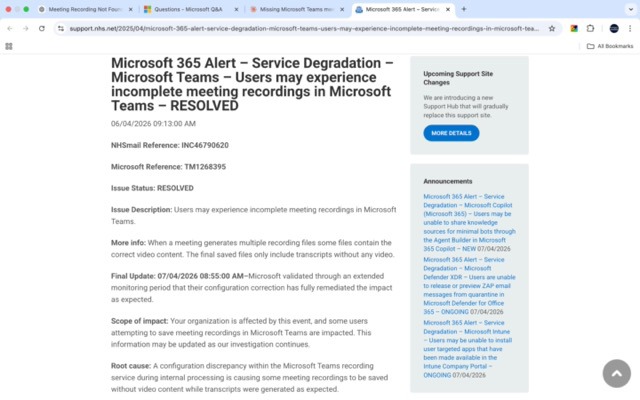
I hope this message finds you well. I am writing to kindly request your assistance in locating and recovering an important meeting recording that appears to have been affected by the recent Microsoft Teams service degradation incident (Microsoft Reference: TM1268395).
ACCOUNT DETAILS:
Name: Dr. Anil Bankar
Account Type: Personal Microsoft Account
Platform: Microsoft Teams (teams.live.com)
Email: [Your Microsoft account email]
MEETING DETAILS:
Meeting Name: International Wellness & Longevity Forum 2026
Date: Tuesday, April 7, 2026
Time: 5:00 PM – 8:00 PM (IST / UAE / UK)
Duration: Approximately 3 hours
Participants: 22+ attendees from India, UAE, UK, and other countries
DESCRIPTION OF ISSUE:
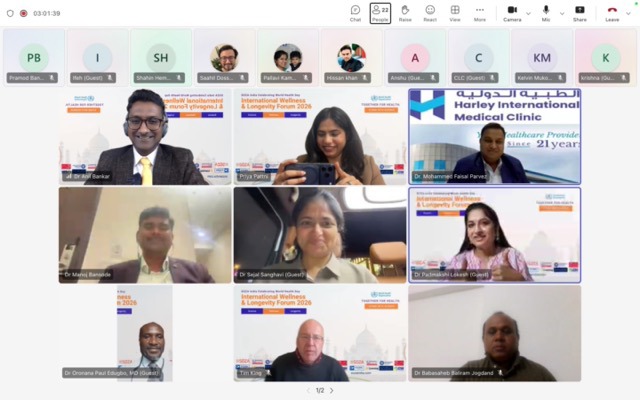
I organised and hosted the above meeting on April 7, 2026, and initiated the recording at the start of the session. I have a screenshot clearly showing the recording was active, with the timer displaying 03:01:39 and the recording indicator visible on screen.
Unfortunately, more than 24 hours after the meeting concluded, the recording has not appeared in any of the usual locations:
- The meeting chat on Microsoft Teams
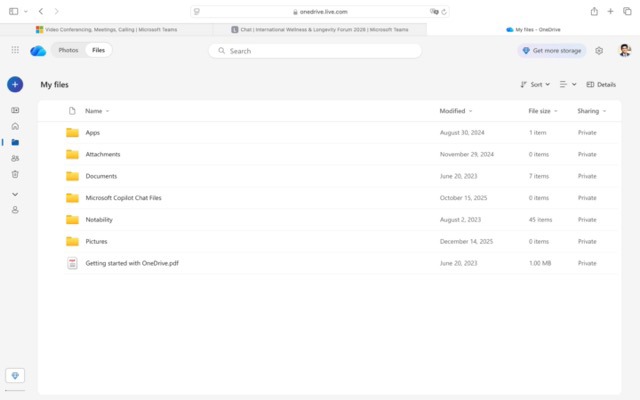
- My OneDrive (onedrive.live.com) — there is no Recordings folder present at all
- Microsoft Stream
- The Recycle Bin
I noticed that this meeting took place during the exact timeframe of your confirmed service degradation incident (TM1268395), in which a configuration issue within the Teams recording service caused some recordings to be saved without video content or not saved at all. I understand this has now been marked as resolved, and I appreciate Microsoft's efforts in addressing it.
I kindly believe my recording may have been caught in this window and may still be recoverable from your backend or temporary storage systems.
EVIDENCE I HAVE:
- Screenshot of the live meeting showing the active recording indicator at 03:01:39 with 22+ participants
- Screenshot of Teams chat showing no recording link appeared after the meeting
- Screenshot of OneDrive confirming no Recordings folder exists
- Screenshot of the Microsoft 365 Service Degradation Alert (TM1268395)
- Meeting link https://teams.live.com/meet/938174729757?p=SQRMNMXBTerdhGfI2V
I am happy to share any of these if required.
Moved from Microsoft 365 Insider | Microsoft Teams | MacOS
' cx='32' cy='32' r='32' /%3E%3Ctext x='50%25' y='55%25' dominant-baseline='middle' text-anchor='middle' fill='%23FFF' %3EDA%3C/text%3E%3C/svg%3E)

' cx='32' cy='32' r='32' /%3E%3Ctext x='50%25' y='55%25' dominant-baseline='middle' text-anchor='middle' fill='%23FFF' %3ERB%3C/text%3E%3C/svg%3E)
