Dear @ER CHENG YOU,
Thank you for reaching out to the Microsoft Q&A forum!
First of all, we sincerely apologize for any inconvenience this may have caused. Recently, we have received a number of similar requests, and the issue has also been reported by several other users. This matter is currently under investigation, and Microsoft will provide updates as more information becomes available. If you are experiencing this problem, it may be related to the ongoing incident.
To begin troubleshooting, please try the following steps:
If the issue persists after completing the steps above, we recommend reporting this unexpected behavior directly to Microsoft.
Please follow the instructions below to submit a report through the Teams app.
- Open the menu by selecting the three‑dots icon next to your profile
- Then go to Feedback and choose Report a problem to share diagnostics with Microsoft.
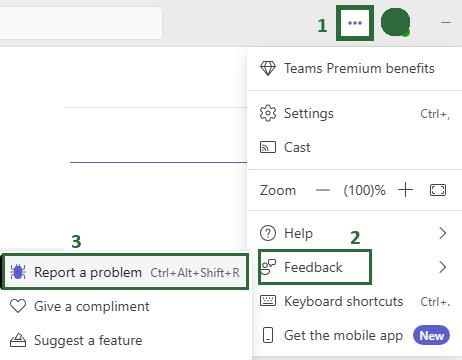
Additionally, you may also inform your school or organization’s IT administrator so they can raise a support request ticket with Microsoft on your behalf.
If you are unsure who your IT admin is, please refer to this link: How do I find my Microsoft 365 admin? Once you identify the administrator, provide them with the following link: Get support - Microsoft 365 admin | Microsoft Learn
Please notice and accept my apologies that as moderators in the community, we are not supported for the product design and have limited resources for the advanced info for Microsoft products. To help you send your feedback and requirement to the related development team, we have redirected you to the correct path.
As I have already reported to the product team, if any updates or announcements are made regarding this feature, I will make sure to share them with you as soon as possible.
Note: Please reassured that you are not alone, I’ll continue to monitor this case and will reach out to you with any new updates as soon as possible.
Again, thank you for your patience and understanding. If you have any further questions, feel free to let me know.
If the answer is helpful, please click "Accept Answer" and kindly upvote it. If you have extra questions about this answer, please click "Comment".
Note: Please follow the steps in our documentation to enable e-mail notifications if you want to receive the related email notification for this thread.
' cx='32' cy='32' r='32' /%3E%3Ctext x='50%25' y='55%25' dominant-baseline='middle' text-anchor='middle' fill='%23FFF' %3EEC%3C/text%3E%3C/svg%3E)


' cx='32' cy='32' r='32' /%3E%3Ctext x='50%25' y='55%25' dominant-baseline='middle' text-anchor='middle' fill='%23FFF' %3EJN%3C/text%3E%3C/svg%3E)