Hi @Piotr,
Welcome to Microsoft Q&A forum.
Thanks for reaching out to us. I understand you’re trying to delete an auto‑reply without sending the entire thread to Deleted Items. In the new Outlook, this can happen when the conversation header (the top line that represents the whole thread) is selected instead of the individual message inside the thread. When the header is highlighted, the Delete action applies to the entire conversation; when a single message row is selected, Delete only removes that one item.
Here are workarounds to remove just one message while keeping the rest of the thread intact:
Option 1: Temporarily turn off grouping
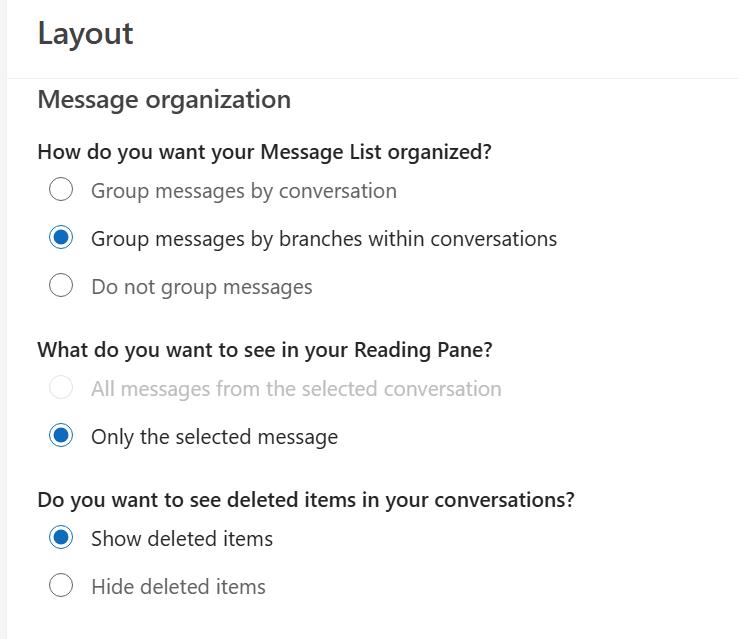
- Go to Settings (gear) → Mail → Layout → Message organization.
- Select Do not group messages.
- Delete the auto‑reply.
- Switch back to your preferred grouping afterwards.
In this view, the Delete action targets only the selected message.
Option 2: Stay in Conversation view and target the message
- In your message list, expand the conversation (click the small triangle).
- Select the specific auto‑reply - make sure only that row is highlighted (not the conversation header).
- Click the trash can in the reading pane, or right‑click → Delete on that row.
If the header is selected, Outlook will delete the entire conversation, so ensure the single message is selected.
Option 3: Open the message in its own window, then delete
- Double‑click the auto‑reply to open it in a separate window, then press Delete. This targets the message itself, not the conversation container, and prevents conversation‑level deletion.
Note: Avoid Clean Up Conversation when you only want to remove one item - Clean Up intentionally moves “redundant” messages in the thread to Deleted Items, which can look like bulk deletion.
I truly appreciate you sharing your feedback because your issue is thoughtful, practical, and reflects a real need that many users likely share. Ideas like yours help us improve the product in meaningful ways.
Therefore, I strongly recommend submitting your feedback through the Outlook (new) · Community. This is the most effective way to ensure your voice reaches the product team and can be considered for future improvements.

Once you've submitted your feedback, feel free to share the link here in the comments. I’ll be happy to upvote it to help bring more visibility.
Additionally, since many other users have expressed similar concerns but may not know where to submit feedback, if my response has helped you better understand the situation and guided you toward a possible next step, please mark it as the “Accepted Answer.” Your action will help pin this post to the top, making it easier for others in the community who are experiencing the same issue to find your feedback and support it.
Thank you for your kindness and contributions to the forum.
If the answer is helpful, please click "Accept Answer" and kindly upvote it. If you have extra questions about this answer, please click "Comment".
Note: Please follow the steps in our documentation to enable e-mail notifications if you want to receive the related email notification for this thread.
' cx='32' cy='32' r='32' /%3E%3Ctext x='50%25' y='55%25' dominant-baseline='middle' text-anchor='middle' fill='%23FFF' %3EP%3C/text%3E%3C/svg%3E)


' cx='32' cy='32' r='32' /%3E%3Ctext x='50%25' y='55%25' dominant-baseline='middle' text-anchor='middle' fill='%23FFF' %3EKL%3C/text%3E%3C/svg%3E)