Hi @Cynthia Marsh,
Thank you for posting your question in the Microsoft Q&A forum.
Based on your description, you’re using the new Planner experience with both Premium and Basic licenses and cannot add checklist items; you also noted that “Add to card” is unavailable with Premium. We truly understand and appreciate the time you invested testing across licenses and sharing specifics.
Premium plans use the Project‑type task model that prioritizes scheduling and dependencies. The checklist control is available in the task Details pane, but the “Show on card/Add to card” toggle is not supported in Premium. In Basic (Planner‑type) plans, checklist is supported and can be shown on the card; however, if a plan or task is opened in the Project‑type mode or you lack edit permissions, the checklist may appear disabled.
Below are some workarounds that suit for your situation:
In Planner, inside a task, it is not possible to create/add a checklist template. You have to enter each item of the list every time you create a new task.
- Open your plan in Planner (web or Teams) and select the task.
- In the task Details pane, locate Checklist and select Add an item.
- Type the item and press Enter to add additional items.
- Turn on Show on card if you want checklist lines visible on the Board card.
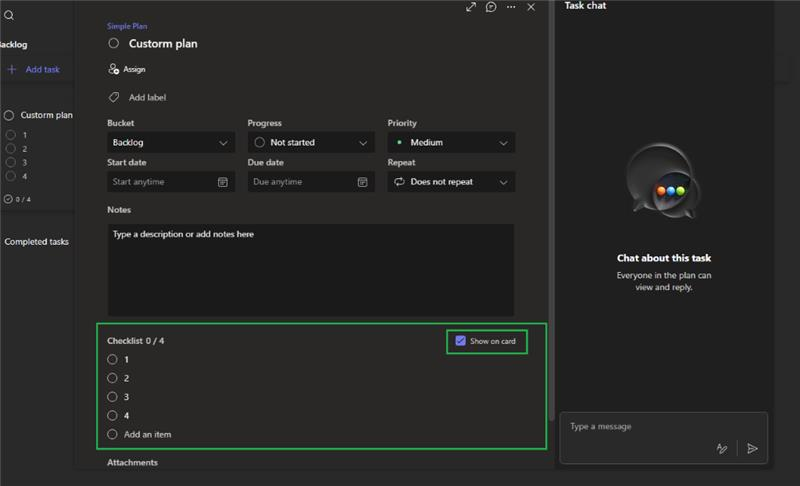
For your reference: Use task checklists in Microsoft Project for the web - Microsoft Support
- In Premium (Project‑type) plan
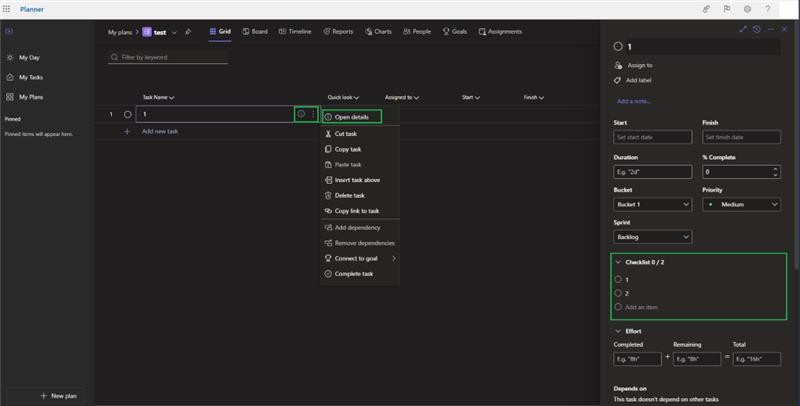
- Open the task and choose More (…) > Open details to expand the full Details pane.
- Scroll to Checklist and select Add an item.
- Type each item and press Enter to add the next. Note: Show on card is not available in Premium.
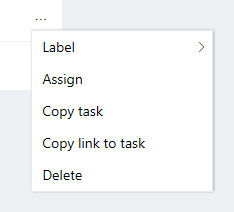
After creating a task, if you want to use it for a template, you can copy the task by clicking the ellipsis in the task, then choose Copy task:
If “Add an item” is missing or disabled
- Confirm you have edit/membership permissions on the plan.
- Check whether the task already has 20 checklist items, which is the current limit; remove one to add another.
- If your plan needs card‑level visualization of checklists, create a Basic plan for those tasks and use Show on card.
If you prefer, I can walk through your current plan type and permissions and tailor the steps to your exact workspace.
As community moderators, we appreciate your understanding that our access to internal development details is limited. Our primary role is to guide users toward the appropriate resources and support channels. While we may not have visibility into deeper backend analysis, we’ll continue doing our best to support you within the scope of our responsibilities.
I hope this information is helpful. Please follow these steps and let me know if it works for you. If you have any updates regarding the issue, please feel free to share them with me.
Thank you for your patience and your understanding. If you have any questions or need further assistance, please feel free to share them in the comments on this post so I can continue to support you.
I look forward to continuing the conversation.
If the answer is helpful, please click "Accept Answer" and kindly upvote it. If you have extra questions about this answer, please click "Comment".
Note: Please follow the steps in our documentation to enable e-mail notifications if you want to receive the related email notification for this thread.
' cx='32' cy='32' r='32' /%3E%3Ctext x='50%25' y='55%25' dominant-baseline='middle' text-anchor='middle' fill='%23FFF' %3ECM%3C/text%3E%3C/svg%3E)

' cx='32' cy='32' r='32' /%3E%3Ctext x='50%25' y='55%25' dominant-baseline='middle' text-anchor='middle' fill='%23FFF' %3EVN%3C/text%3E%3C/svg%3E)