Hi Mike Jantzi
Thank you for posting your question in Microsoft Q&A.
Based on your description, I understand that Outlook 2016 is displaying an unread email count, but the message itself is not visible in your Inbox.
Here are some recommended solutions you can try:
Force a Search for Hidden Items: Sometimes an item is marked as unread but not shown outside your current view or filter settings.
Click into the Search bar at the top of your Outlook window > type the following command exactly: isread:no > Enter.
If no results appear, ensure the search scope (located in the top-left of the Search tab) is set to All Outlook Items.
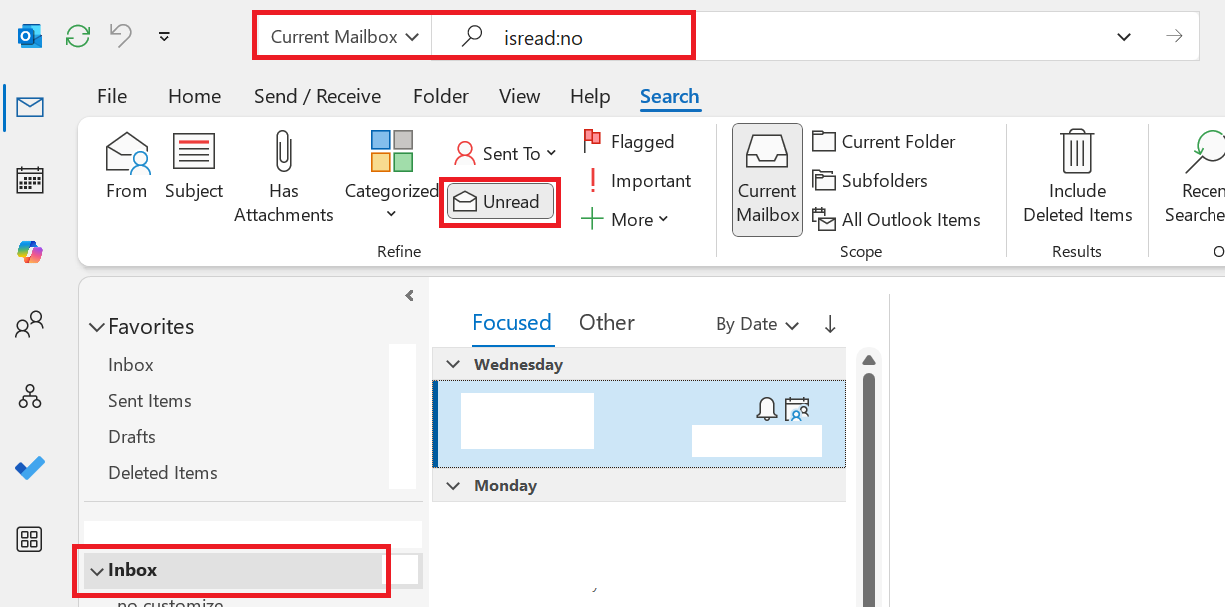
Clear Offline Items (Reset Local Cache)
If the search yields no results, the problem is an incorrect count in the local cache. You need to clear the local view of the folder and force Outlook to re-download a fresh copy from the server.
- Right-click the folder showing the incorrect count (ex: Inbox) > Properties.
- Click the Clear Offline Items button.

A warning will pop up stating "All items in your offline folder will be deleted" > Click OK.
Note: This does not delete your actual emails. It only removes the temporary local copy from your computer.
The folder will appear empty. Navigate to the Send / Receive tab on the top ribbon and click Update Folder > Outlook will now re-download your emails from the server, correcting the unread count.
Create a New Outlook Profile
If the issue persists after clearing the cache, your local Outlook profile may be corrupted. We will create a new profile to start fresh. You can find detailed steps here: Create an Outlook profile - Microsoft Support
I hope these suggestions provide some helpful ideas. If you need further assistance, feel free to ask via comments section.
If the answer is helpful, please click "Accept Answer" and kindly upvote it. If you have extra questions about this answer, please click "Comment".
Note: Please follow the steps in our documentation to enable e-mail notifications if you want to receive the related email notification for this thread.
' cx='32' cy='32' r='32' /%3E%3Ctext x='50%25' y='55%25' dominant-baseline='middle' text-anchor='middle' fill='%23FFF' %3EMJ%3C/text%3E%3C/svg%3E)


' cx='32' cy='32' r='32' /%3E%3Ctext x='50%25' y='55%25' dominant-baseline='middle' text-anchor='middle' fill='%23FFF' %3EHN%3C/text%3E%3C/svg%3E)