Hi @Melanie Nigrinis,
Thank you for posting your question in the Microsoft Q&A forum.
Based on your description, you are changing your company name and want to update your Microsoft 365 domain and Outlook email address while ensuring email continues to arrive at the new address. We truly understand this transition takes thoughtful preparation and appreciate the effort you are investing.
When a company name or domain changes, Outlook and Microsoft 365 treat this as a domain update within your organization. Your new domain must first be added and verified in Microsoft 365 before you can assign the new email addresses. After this configuration, your existing mailbox and emails remain intact, nothing will be lost during the process. You can also set up forwarding so messages sent to your old address are automatically delivered to your new one.
Below are some workarounds that suit for your situation:
1/ Start by registering the new domain and confirming its validity (admin only).
- In Microsoft 365 admin center, go to Setup then Domains, choose Add domain, and complete TXT DNS verification. Wait for DNS propagation.
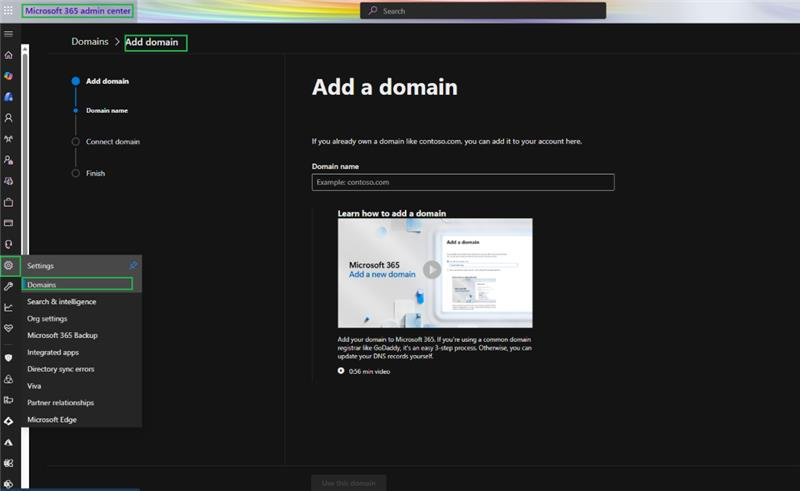
- Once verified, go to Users > Active users, select each user, and update their Username/Email to use the new domain.
2/ Proceed by updating address details and confirming mail flow functionality.
3/ Next, ensure classic Outlook is refreshed and synchronized on every device.
- Restart Outlook to pick up the change. If it still prompts for the old address, create a new profile from Control Panel then Mail then Show Profiles then Add, and sign in with the new address.
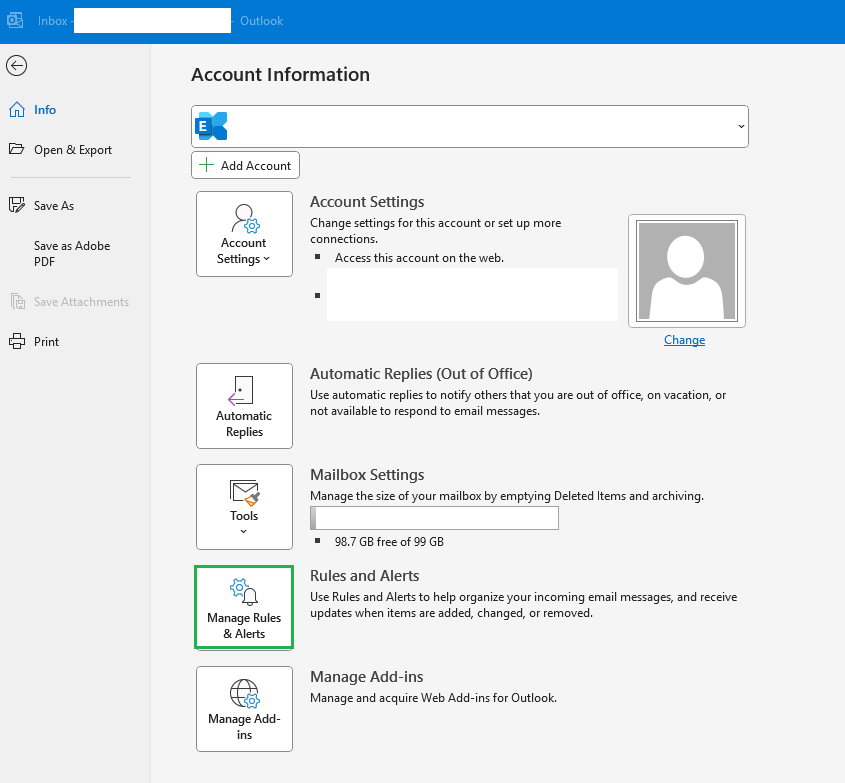
- To forward old emails, open Outlook (Classic), go to File > Manage Rules & Alerts, and create a new rule to forward emails from your old address to your new one.
4/ After that, execute comprehensive testing and confirm end-to-end results.
- Send test messages to both the old and new addresses, verify delivery, and confirm calendar and shared access after directory and DNS updates finish syncing.
5/ As your account is managed by your organization, please contact your IT administrator to check your permission, policies, and help you add new domain.
As community moderators, we appreciate your understanding that our access to internal development details is limited. Our primary role is to guide users toward the appropriate resources and support channels. While we may not have visibility into deeper backend analysis, we’ll continue doing our best to support you within the scope of our responsibilities.
I hope this information is helpful. Please follow these steps and let me know if it works for you. If you have any updates regarding the issue, please feel free to share them with me.
Thank you for your patience and your understanding. If you have any questions or need further assistance, please feel free to share them in the comments on this post so I can continue to support you.
I look forward to continuing the conversation.
If the answer is helpful, please click "Accept Answer" and kindly upvote it. If you have extra questions about this answer, please click "Comment".
Note: Please follow the steps in our documentation to enable e-mail notifications if you want to receive the related email notification for this thread.
' cx='32' cy='32' r='32' /%3E%3Ctext x='50%25' y='55%25' dominant-baseline='middle' text-anchor='middle' fill='%23FFF' %3EMN%3C/text%3E%3C/svg%3E)


' cx='32' cy='32' r='32' /%3E%3Ctext x='50%25' y='55%25' dominant-baseline='middle' text-anchor='middle' fill='%23FFF' %3EVN%3C/text%3E%3C/svg%3E)