Microsoft 365 and Office | Excel | For home | MacOS
A family of Microsoft spreadsheet software with tools for analyzing, charting, and communicating data.

This browser is no longer supported.
Upgrade to Microsoft Edge to take advantage of the latest features, security updates, and technical support.
' cx='32' cy='32' r='32' /%3E%3Ctext x='50%25' y='55%25' dominant-baseline='middle' text-anchor='middle' fill='%23FFF' %3EDW%3C/text%3E%3C/svg%3E)
Hi, I have renewed my Microsoft subscription in November through Apple and all was working fine on my laptop, desktop and phone. But just as of yesterday, my Excel, PowerPoint, and Word keeps throwing me this prompt that I need to get a 1-month trial to enjoy the full benefits of the programs. I clicked on it and tried to log in and activate my existing membership but it says I have no subscription found.
My email address for my apple registered is ******@yahoo.com.sg so I don't understand why there's an issue using the same email to register. My app on my phone is still working fine. Kindly assist and advice. Thank you,

It sounds like you're experiencing activation issues with your Microsoft 365 subscription on your desktop applications, despite having renewed your subscription. Here are some steps you can take to troubleshoot the problem:
If these steps do not resolve your issue, consider reaching out to Microsoft support for further assistance.
References:
' cx='32' cy='32' r='32' /%3E%3Ctext x='50%25' y='55%25' dominant-baseline='middle' text-anchor='middle' fill='%23FFF' %3ESD%3C/text%3E%3C/svg%3E)
Hi Desmond,
Are you sure you have a Linked or Microsoft 365 subscription from the Apple Store to the correct Microsoft account? I believe Microsoft Office is free for iPhones.
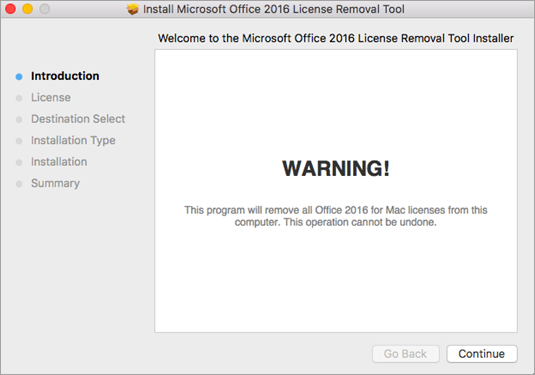
Note: If you get an "unidentified developer" error, try opening the file by holding Control + clicking the file > Open.
Caution: We recommend you double-check that you have the correct account info ready by logging into Office.com/signin and checking for the license you want to activate with.
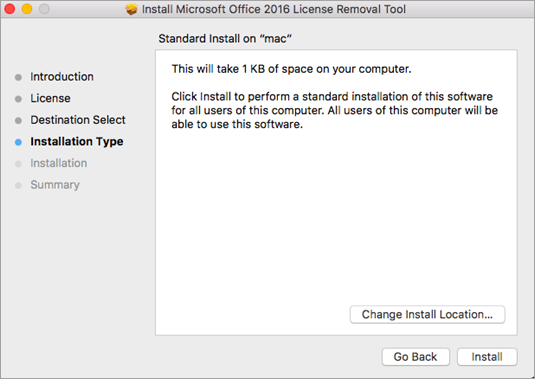
After the tool successfully removes licenses, select Close.
After you've successfully activated, restart your computer and then you're good to go!
Note: If your account has both a Microsoft 365 for Mac license and a one-time purchase associated with it, you'll be prompted to choose which license you want to activate with. We recommend always choosing Microsoft 365 for Mac if available.
I’m eager to hear back and work together to find a solution.
I did renew through Apple and I have been paying 154/Y since three four years ago. Here’s a screenshot of my renewal
Thanks, Desmond. Please let me know if the license refresh as indicated does not help!
Thanks for being so helpful. Unfortunately I am running into the same error where it doesn't recognize my account. I did a double take with Apple and I do have the receipts for the renewal subscription. Is there someone that is in Microsoft that can just troubleshoot it remotely for me?
Hi Desmond, Since this is a user-user support forum, you can contact Microsoft;
Please get in touch with Microsoft Support for further help.
Please go to https://support.microsoft.com/contactus page
Type the ""Chat with someone"" option and press Enter.
Please click on the ""Contact support"" button at the bottom.
Select the Product and Category for support according to your requirement.
The available support methods will be shown to you.