Hi Houston Beckworth,
Welcome to Microsoft Q&A Forum!
Have a good day and I hope you're doing well!
Thank you for reaching out about the frustration you're experiencing with Legacy Outlook on your MacBook. I totally get why you'd want that 1-minute delay on all outgoing emails.
Based on my own research and testing on a virtual machine, I can confirm that the "delay delivery for all messages" feature you're looking for isn't natively available in Legacy Outlook for Mac. That said, there are some workable alternatives in the newer Outlook experiences that might help bridge the gap.
References: Undo Send in Outlook for Mac
Here's what I found:
1. In Outlook Web App: Go to Settings > Mail > Compose and reply. Under "Undo Send," you can set a delay of up to 10 seconds. It's not a full minute, but it gives you a quick window to cancel if needed. 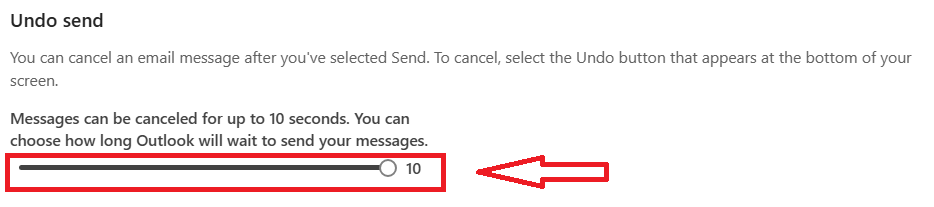
2. In New Outlook for Mac: Head to Settings > Composing > Undo Send. Here, you can extend the delay up to 120 seconds. 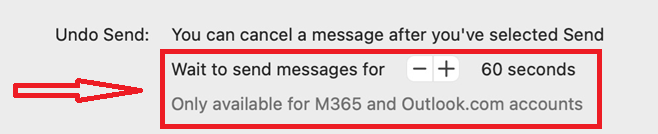
Just a heads-up: This feature is only available for outlook.com and Microsoft 365 accounts, so it might not work with other email providers.
If switching to New Outlook or using the web version feels like a good fit, I'd recommend trying that for any important emails where you want extra time to review before they go out. This option provides an effective way to reduce accidental mistakes without requiring significant changes to your existing setup.
As a fallback in Legacy Outlook itself, you might consider using the "Schedule Send" feature. This lets you prepare and schedule emails to send at a specific time, giving you plenty of opportunity to double-check everything before it actually goes out. It's not an automatic delay on every email, but it could be a handy workaround for those critical messages.
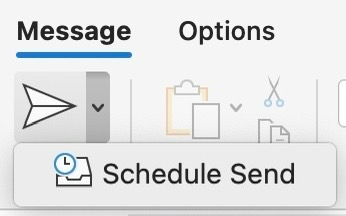
References: Schedule send for Outlook on Mac
I hope this information is at least partially helpful and points you in a useful direction! If I misunderstood anything about your setup, or if you have more details/questions/concerns, feel free to reach out. I'm happy to dive deeper or clarify.
If the answer is helpful, please click "Accept Answer" and kindly upvote it. If you have extra questions about this answer, please click "Comment".
Note: Please follow the steps in our documentation to enable e-mail notifications if you want to receive the related email notification for this thread.
' cx='32' cy='32' r='32' /%3E%3Ctext x='50%25' y='55%25' dominant-baseline='middle' text-anchor='middle' fill='%23FFF' %3EHB%3C/text%3E%3C/svg%3E)


' cx='32' cy='32' r='32' /%3E%3Ctext x='50%25' y='55%25' dominant-baseline='middle' text-anchor='middle' fill='%23FFF' %3EMP%3C/text%3E%3C/svg%3E)