Hi Lisa Darch,
Welcome to Microsoft Q&A Forum! Have a good day and I hope you're doing well!
Thanks for reaching out. Let’s get Outlook on your Mac looking exactly the way you prefer. Below are clear steps to reset your default fonts and adjust reading/compose sizes.
Set your default font for email in Outlook for Mac
Access the Fonts panel
- From the menu bar, go to Outlook > Settings.
- In Outlook Settings, select Fonts.
- In the Fonts panel, note the message types you can customize (e.g., New mail, Reply or forward).
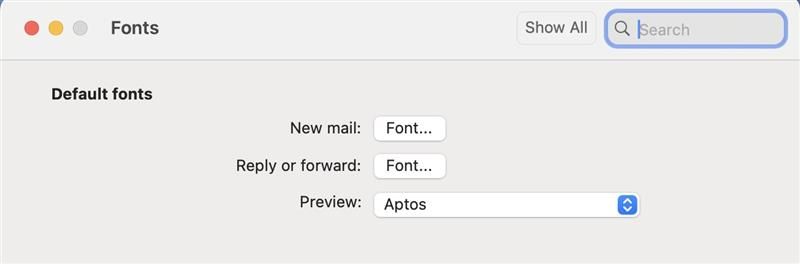
- Choose the message type you want to change.
- For New mail and Reply or forward, select the Font… button and pick your preferred Font and Size.
Adjust font size while reading messages in a folder
- Select a message in your Inbox (or Sent, Drafts, etc.).
- On the Format menu, choose Increase Font Size or Decrease Font Size.
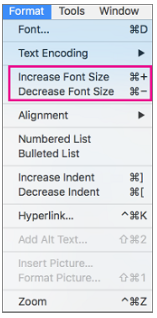
- The change applies to all mail in the current folder or subfolder. When you navigate away, the folder’s text returns to its default size.
Adjust zoom while composing a new email
- Place the cursor in the body of the message you’re composing.
- Go to Format > Zoom.
- Select a zoom percentage or enter a custom value. After you send the message, the default size is reinstated.
Note: Incoming HTML messages may carry their own fonts and sizes, so your font settings might not override how some messages display.
Important setting to check (can cause format to change)
- Go to Outlook > Settings > Composing > Format.
- If “When replying or forwarding, use the format of the original message” is checked, uncheck it.
- This prevents Outlook from inheriting the sender’s formatting so your replies/forwards use your own default font and style.
References
I hope this is at least partially helpful. If anything is unclear, if I misunderstood your setup, or if you have any questions or concerns, feel free to reach out.
If the answer is helpful, please click "Accept Answer" and kindly upvote it. If you have extra questions about this answer, please click "Comment".
Note: Please follow the steps in our documentation to enable e-mail notifications if you want to receive the related email notification for this thread.
' cx='32' cy='32' r='32' /%3E%3Ctext x='50%25' y='55%25' dominant-baseline='middle' text-anchor='middle' fill='%23FFF' %3ELD%3C/text%3E%3C/svg%3E)

' cx='32' cy='32' r='32' /%3E%3Ctext x='50%25' y='55%25' dominant-baseline='middle' text-anchor='middle' fill='%23FFF' %3ER%3C/text%3E%3C/svg%3E)

' cx='32' cy='32' r='32' /%3E%3Ctext x='50%25' y='55%25' dominant-baseline='middle' text-anchor='middle' fill='%23FFF' %3EMP%3C/text%3E%3C/svg%3E)
' cx='32' cy='32' r='32' /%3E%3Ctext x='50%25' y='55%25' dominant-baseline='middle' text-anchor='middle' fill='%23FFF' %3EJ%3C/text%3E%3C/svg%3E)