Hi @Rudaina Al-Najjar,
Thank you for posting your question to the Microsoft Q&A forum.
I completely understand how valuable gridlines can be when working in PowerPoint, especially for precise alignment and layout.
Since you're using a Chromebook, PowerPoint Online is the available version and at the moment, it doesn’t include the gridlines feature. That said, you can still take advantage of alignment guides and smart guides, which appear automatically as you move objects and can be very helpful for consistent positioning.
We recognize how important this functionality is to your workflow. I encourage you to share your feedback directly through the Microsoft Feedback Portal. Input from users like you plays a key role in shaping future updates and enhancements.
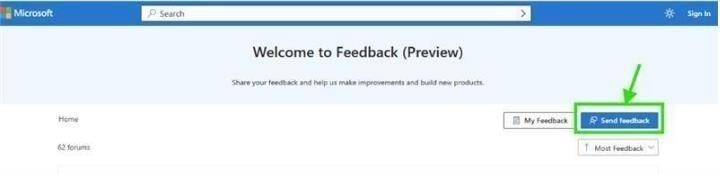
Using this channel to voice your needs is one of the most effective ways to advocate for improvements that could benefit both you and the broader user community.
As community moderators, our role is to guide users to the right resources and support avenues. While we don’t have direct influence over product design decisions or access to internal development details, we remain committed to supporting you as best we can within our scope.
We sincerely appreciate your patience and the time you’ve taken to raise this concern. Although we’re unable to make changes to the product ourselves, please don’t hesitate to reach out if you have any other questions.
Whishing you a great day ahead.
If the answer is helpful, please click "Accept Answer" and kindly upvote it. If you have extra questions about this answer, please click "Comment".
Note: Please follow the steps in our documentation to enable e-mail notifications if you want to receive the related email notification for this thread.
' cx='32' cy='32' r='32' /%3E%3Ctext x='50%25' y='55%25' dominant-baseline='middle' text-anchor='middle' fill='%23FFF' %3ERA%3C/text%3E%3C/svg%3E)

' cx='32' cy='32' r='32' /%3E%3Ctext x='50%25' y='55%25' dominant-baseline='middle' text-anchor='middle' fill='%23FFF' %3EJT%3C/text%3E%3C/svg%3E)