Hi @Emily W,
Thank you for posting your question in the Microsoft Q&A forum, and I appreciate the detailed context you provided.
The agenda pane you’re referring to was part of the Classic Outlook To‑Do Bar experience. In New Outlook for Windows, this feature has been redesigned, and the pinned daily agenda view is no longer available in the same form. Here’s what you need to know:
- The customizable To‑Do Bar (Calendar, Tasks, People) is a Classic Outlook feature.
- In New Outlook, Microsoft has integrated tasks and agenda into the My Day pane and recommends using Microsoft To Do for task management.
- Unfortunately, there is currently no option to re‑enable the old agenda pane in New Outlook.
I would like to offer a few work-around steps that may help improve your experience in the New Outlook:
1/ Use the “My Day” pane:
- Click the My Day icon (calendar with a checkmark) in the top‑right corner.
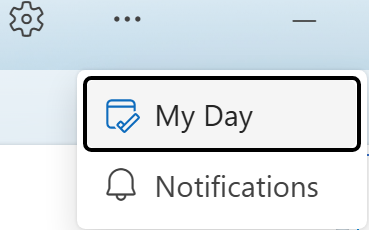
- Switch between Agenda and Tasks views.
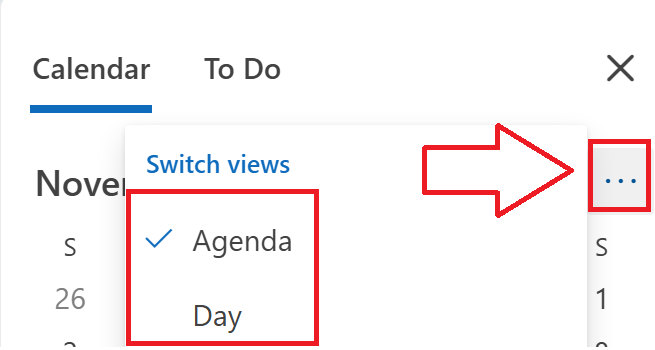
- Note: It opens on the right but cannot be permanently pinned like the old agenda pane.
2/ Split view workaround:
- Open Calendar in a new window and position it side‑by‑side with Mail to simulate a persistent agenda view.
3/ Reverse to Classic Outlook:
- If this feature is critical to your workflow, you may consider switching back to Classic Outlook, where the To‑Do Bar is still supported. Keep in mind that Microsoft plans to transition users to New Outlook over time.
- You can see how to do it here: Revert to classic Outlook
As community moderators, our role is to help guide users to the right resources and support channels. While we don’t have direct influence over product design or access to internal development roadmaps, we’re here to ensure your feedback is heard and to assist you in any way we can.
Since this has a big impact on productivity, I strongly recommend submitting feedback directly to the product team.
You can do this in Outlook by selecting Help > Feedback, or through the Microsoft 365 Feedback Hub > Send Feedback > Describe your proposal in detail so the team can consider it for future improvements.

Once you’ve submitted your feedback, feel free to share the link here. I’ll be happy to upvote it to help bring more visibility.
Additionally, if my response has helped clarify the situation and guided you toward the next step, please mark it as the "Accepted Answer". This will help others in the community who face the same issue find your feedback and support it.
Thank you for your kindness and contributions to the forum.
As other users will also be looking for information in this community, please click on "Accept Answer" and feel free to vote for this answer. Your valuable vote will definitely help other users with similar questions to find the right channel and useful information more easily.
Thank you for your kind words.
Note: Please follow the steps in our documentation to enable email notifications if you want to receive notifications related to this thread.
' cx='32' cy='32' r='32' /%3E%3Ctext x='50%25' y='55%25' dominant-baseline='middle' text-anchor='middle' fill='%23FFF' %3EE1%3C/text%3E%3C/svg%3E)

' cx='32' cy='32' r='32' /%3E%3Ctext x='50%25' y='55%25' dominant-baseline='middle' text-anchor='middle' fill='%23FFF' %3ESM%3C/text%3E%3C/svg%3E)

' cx='32' cy='32' r='32' /%3E%3Ctext x='50%25' y='55%25' dominant-baseline='middle' text-anchor='middle' fill='%23FFF' %3EHL%3C/text%3E%3C/svg%3E)
' cx='32' cy='32' r='32' /%3E%3Ctext x='50%25' y='55%25' dominant-baseline='middle' text-anchor='middle' fill='%23FFF' %3EV%3C/text%3E%3C/svg%3E)
' cx='32' cy='32' r='32' /%3E%3Ctext x='50%25' y='55%25' dominant-baseline='middle' text-anchor='middle' fill='%23FFF' %3EMG%3C/text%3E%3C/svg%3E)
' cx='32' cy='32' r='32' /%3E%3Ctext x='50%25' y='55%25' dominant-baseline='middle' text-anchor='middle' fill='%23FFF' %3ESW%3C/text%3E%3C/svg%3E)
' cx='32' cy='32' r='32' /%3E%3Ctext x='50%25' y='55%25' dominant-baseline='middle' text-anchor='middle' fill='%23FFF' %3ETC%3C/text%3E%3C/svg%3E)
' cx='32' cy='32' r='32' /%3E%3Ctext x='50%25' y='55%25' dominant-baseline='middle' text-anchor='middle' fill='%23FFF' %3EMK%3C/text%3E%3C/svg%3E)
' cx='32' cy='32' r='32' /%3E%3Ctext x='50%25' y='55%25' dominant-baseline='middle' text-anchor='middle' fill='%23FFF' %3EJK%3C/text%3E%3C/svg%3E)
' cx='32' cy='32' r='32' /%3E%3Ctext x='50%25' y='55%25' dominant-baseline='middle' text-anchor='middle' fill='%23FFF' %3EKN%3C/text%3E%3C/svg%3E)
' cx='32' cy='32' r='32' /%3E%3Ctext x='50%25' y='55%25' dominant-baseline='middle' text-anchor='middle' fill='%23FFF' %3ECB%3C/text%3E%3C/svg%3E)
' cx='32' cy='32' r='32' /%3E%3Ctext x='50%25' y='55%25' dominant-baseline='middle' text-anchor='middle' fill='%23FFF' %3EDS%3C/text%3E%3C/svg%3E)
' cx='32' cy='32' r='32' /%3E%3Ctext x='50%25' y='55%25' dominant-baseline='middle' text-anchor='middle' fill='%23FFF' %3ESH%3C/text%3E%3C/svg%3E)
' cx='32' cy='32' r='32' /%3E%3Ctext x='50%25' y='55%25' dominant-baseline='middle' text-anchor='middle' fill='%23FFF' %3ERB%3C/text%3E%3C/svg%3E)
' cx='32' cy='32' r='32' /%3E%3Ctext x='50%25' y='55%25' dominant-baseline='middle' text-anchor='middle' fill='%23FFF' %3ESJ%3C/text%3E%3C/svg%3E)