Hi @Leroy McLaurin,
Thanks for using Microsoft product and posting in the Microsoft Q&A.
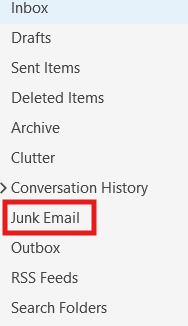
Here's how to locate junk folder in classic Outlook:
- Open your Outlook desktop application.
- Look at the left-hand pane where your mail folders are listed.
- Scroll down the list of folders. You should see a folder named "Junk Email" (or sometimes just "Junk").
Thank you again for your patience and for choosing Microsoft Q&A forum. Please let me know if there’s anything else I can assist you with.
If the answer is helpful, please click "Accept Answer" and kindly upvote it. If you have extra questions about this answer, please click "Comment".
Best regards
Chloe L. | Microsoft Q&A Support Specialist
' cx='32' cy='32' r='32' /%3E%3Ctext x='50%25' y='55%25' dominant-baseline='middle' text-anchor='middle' fill='%23FFF' %3ELM%3C/text%3E%3C/svg%3E)

' cx='32' cy='32' r='32' /%3E%3Ctext x='50%25' y='55%25' dominant-baseline='middle' text-anchor='middle' fill='%23FFF' %3EPK%3C/text%3E%3C/svg%3E)

' cx='32' cy='32' r='32' /%3E%3Ctext x='50%25' y='55%25' dominant-baseline='middle' text-anchor='middle' fill='%23FFF' %3EWM%3C/text%3E%3C/svg%3E)
' cx='32' cy='32' r='32' /%3E%3Ctext x='50%25' y='55%25' dominant-baseline='middle' text-anchor='middle' fill='%23FFF' %3ECL%3C/text%3E%3C/svg%3E)