Hello Kurt Willoughby,
Welcome to the Microsoft Community.
I understand that you are having problems adding a balance to your daughter's account and that you have checked a lot of information to make sure they are correct but at three hours old her account is still not showing a balance. I understand the inconvenience this has caused.
There may be a delay in the arrival of the balance but it does not usually take longer than 3 hours and obviously this is not normal. But don't worry, Microsoft will assist in the investigation.
This is a technical discussion community is not authorized to investigate issues regarding subscriptions and payment, but I will point you in the right direction.
The best way to handle investigating this issue and is to contact Microsoft's department at Billing & Subscriptions for one-on-one assistance.
Contact Microsoft Support.
- Visit this website: Contact - Microsoft Support
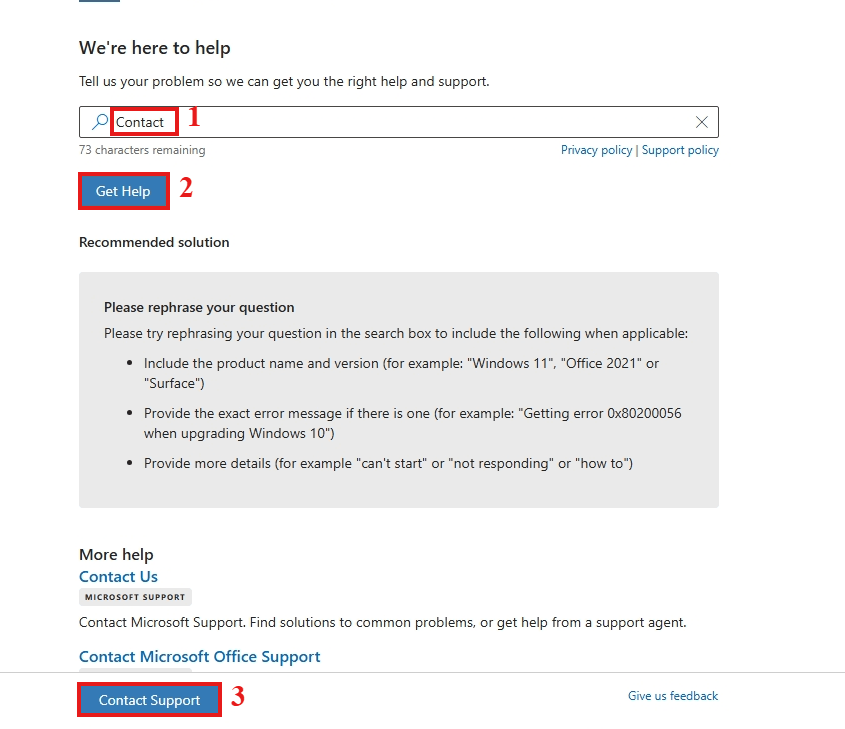
- Type Contact in the search box.
- Now click Get help, and Select Contact Support or sign in to contact support below.
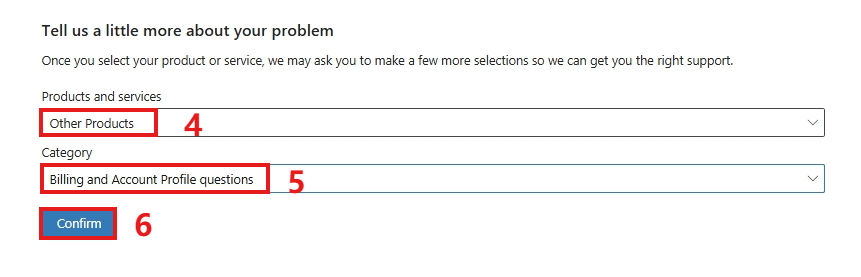
- Go to the Products and services tab, and choose Other Products category.
- On the Category tab, choose Billing and Account Profile questions.
- Go to Confirm.
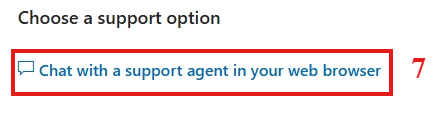
- You can now choose the option of Chat with a support agent on your web browser.
The following images indicate in detail the steps to contact them:
Please Note*: The Chat support team only works at certain work times, (Monday to Friday: 9am to 6pm. Saturday and Sunday: 10 a.m. to 6 p.m.)so if the last window says you are not available, try to open it again the next day.* If you prefer phone support, you can leave a phone number. That way, they can call you and help you.
Thank you for your patience in reading, we hope this information has been helpful to you.
Best regards,
Ian - MSFT | Microsoft Community Support Specialist
' cx='32' cy='32' r='32' /%3E%3Ctext x='50%25' y='55%25' dominant-baseline='middle' text-anchor='middle' fill='%23FFF' %3EA%3C/text%3E%3C/svg%3E)
